•11 phút đọc
Kiến trúc tác nhân AI trong thực tế: Bộ nhớ, sử dụng công cụ và các chế độ lỗi

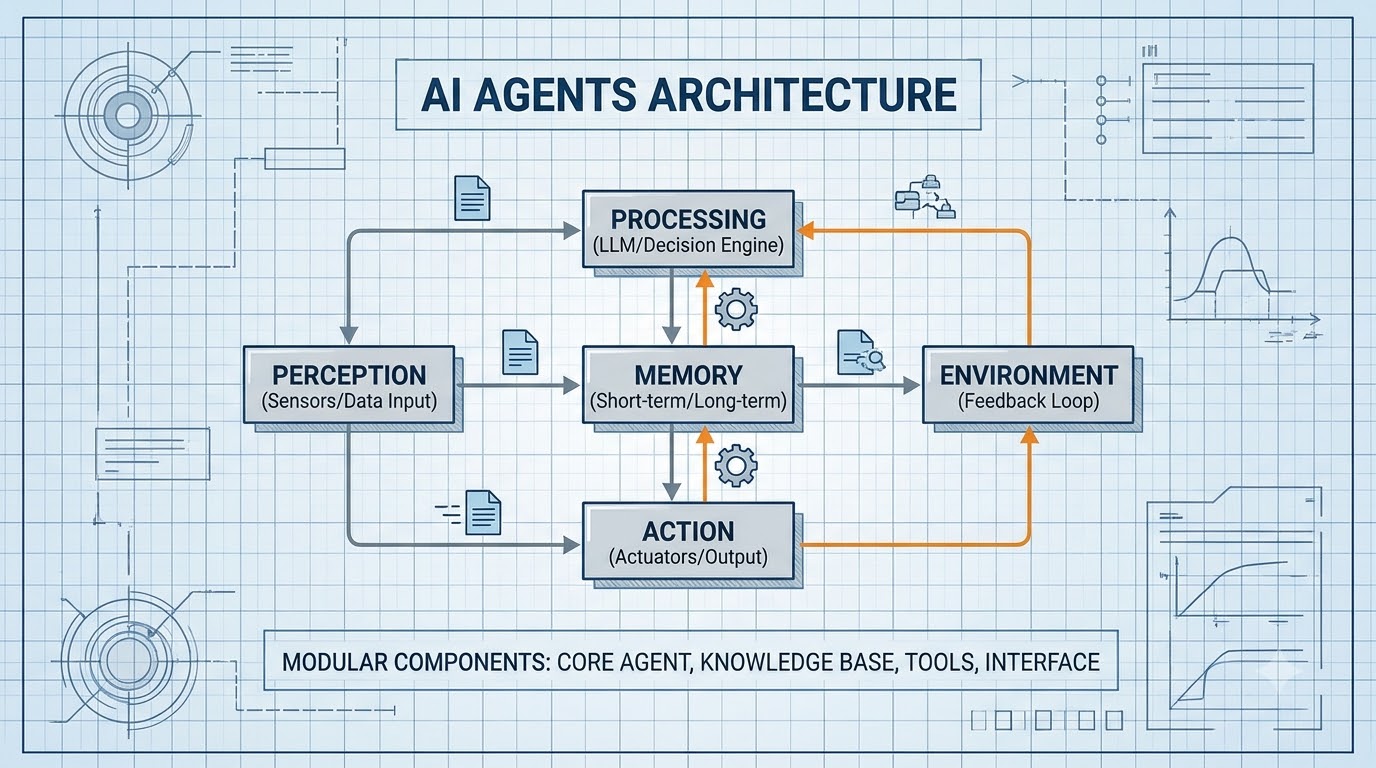
Không thiếu những bài luận kiểu "AI agent sẽ thay đổi mọi thứ". Bài này không phải một trong số đó. Thay vào đó, chúng ta hãy cùng xem xét các quyết định kiến trúc cụ thể mà bạn đưa ra khi xây dựng một hệ thống agent thực tế - và những kiểu thất bại sẽ khiến bạn gặp rắc rối nếu bỏ qua chúng.
Audio Briefing• Voice: Google Cloud vi-VN-Neural2-A
0:00 / --:--
Vòng lặp cốt lõi: ReAct trong thực tế
Hầu hết các hệ thống agent đều sử dụng một biến thể của vòng lặp ReAct (Reason + Act). LLM phát ra một chuỗi thought → action → observation cho đến khi đạt được câu trả lời cuối cùng. Đây là một triển khai tối thiểu sử dụng API của Anthropic:
python
import anthropic
import json
from typing import Any

client = anthropic.Anthropic()

TOOLS = [
    {
        "name": "search_codebase",
        "description": "Search for a pattern in the codebase. Returns matching file paths and line numbers.",
        "input_schema": {
            "type": "object",
            "properties": {
                "query": {"type": "string", "description": "Search query or regex pattern"},
                "file_pattern": {"type": "string", "description": "Glob pattern like '**/*.py'", "default": "**/*"}
            },
            "required": ["query"]
        }
    },
    {
        "name": "read_file",
        "description": "Read a file's contents.",
        "input_schema": {
            "type": "object",
            "properties": {"path": {"type": "string"}},
            "required": ["path"]
        }
    },
    {
        "name": "run_tests",
        "description": "Run the test suite. Returns exit code and stdout.",
        "input_schema": {
            "type": "object",
            "properties": {"test_path": {"type": "string", "default": "tests/"}},
            "required": []
        }
    }
]

def run_agent(task: str, max_iterations: int = 10) -> str:
    messages = [{"role": "user", "content": task}]

    for i in range(max_iterations):
        response = client.messages.create(
            model="claude-opus-4-5",
            max_tokens=4096,
            tools=TOOLS,
            messages=messages
        )

        # Append assistant turn
        messages.append({"role": "assistant", "content": response.content})

        if response.stop_reason == "end_turn":
            # Extract final text
            for block in response.content:
                if hasattr(block, "text"):
                    return block.text
            return "No result"

        if response.stop_reason == "tool_use":
            tool_results = []
            for block in response.content:
                if block.type == "tool_use":
                    result = dispatch_tool(block.name, block.input)
                    tool_results.append({
                        "type": "tool_result",
                        "tool_use_id": block.id,
                        "content": str(result)
                    })
            messages.append({"role": "user", "content": tool_results})

    return "Max iterations reached"

def dispatch_tool(name: str, inputs: dict) -> Any:
    match name:
        case "search_codebase":
            return search_codebase(inputs["query"], inputs.get("file_pattern", "**/*"))
        case "read_file":
            return read_file(inputs["path"])
        case "run_tests":
            return run_tests(inputs.get("test_path", "tests/"))
        case _:
            return f"Unknown tool: {name}"
Đây là bộ khung. Công việc thực sự nằm ở những gì bạn đặt bên trong dispatch_tool và cách bạn xử lý các lỗi.
Kiến trúc bộ nhớ: Điều gì thực sự hiệu quả
Vấn đề về bộ nhớ thực sự khó. Bạn cần agent "ghi nhớ" ngữ cảnh liên quan từ các lần chạy trước mà không phải nhồi nhét 50k token vào mỗi yêu cầu.
Bộ nhớ làm việc (Trong ngữ cảnh)
Bất cứ thứ gì trong cửa sổ ngữ cảnh hiện tại. Nhanh, không tốn chi phí truy xuất, nhưng bị giới hạn và không bền vững. Sử dụng theo dõi trạng thái có cấu trúc:
python
from dataclasses import dataclass, field
from typing import Optional

@dataclass
class AgentState:
    task: str
    completed_steps: list[str] = field(default_factory=list)
    discovered_facts: list[str] = field(default_factory=list)
    current_hypothesis: Optional[str] = None
    open_questions: list[str] = field(default_factory=list)
    iterations: int = 0

    def to_context_block(self) -> str:
        lines = [
            f"Task: {self.task}",
            f"Completed steps: {', '.join(self.completed_steps) or 'none'}",
            f"Key facts: {'; '.join(self.discovered_facts) or 'none'}",
        ]
        if self.current_hypothesis:
            lines.append(f"Current hypothesis: {self.current_hypothesis}")
        if self.open_questions:
            lines.append(f"Still need to check: {', '.join(self.open_questions)}")
        return "\n".join(lines)
Chèn state.to_context_block() vào lời nhắc hệ thống trong mỗi lần lặp. Điều này giúp agent không "quên" những gì nó đã xác minh.
Bộ nhớ dài hạn (Vector Store)
Sử dụng để truy xuất các tương tác hoặc kiến thức liên quan trong quá khứ. Với pgvector:
python
import psycopg2
import numpy as np
from anthropic import Anthropic

client = Anthropic()

def embed(text: str) -> list[float]:
    # Use a dedicated embedding model
    response = client.embeddings.create(
        model="voyage-3",
        input=text
    )
    return response.embeddings[0]

def store_memory(conn, content: str, metadata: dict):
    vector = embed(content)
    with conn.cursor() as cur:
        cur.execute(
            "INSERT INTO agent_memory (content, embedding, metadata) VALUES (%s, %s, %s)",
            (content, np.array(vector), json.dumps(metadata))
        )
    conn.commit()

def recall(conn, query: str, limit: int = 5) -> list[str]:
    vector = embed(query)
    with conn.cursor() as cur:
        cur.execute(
            """
            SELECT content, 1 - (embedding <=> %s::vector) AS similarity
            FROM agent_memory
            ORDER BY embedding <=> %s::vector
            LIMIT %s
            """,
            (np.array(vector), np.array(vector), limit)
        )
        return [row[0] for row in cur.fetchall() if row[1] > 0.75]
Gọi recall() trước mỗi lần chạy agent và chèn các kết quả hàng đầu vào lời nhắc hệ thống. Việc này rẻ - thường là 1-3 truy vấn cơ sở dữ liệu.
Advertisement
Thiết kế công cụ: Nơi hầu hết các Agent gặp lỗi
Nguồn gốc lớn nhất của các lỗi agent không phải là LLM - mà là các công cụ được thiết kế kém. Ba kiểu gây ra lỗi:
1. Công cụ trả về quá nhiều
python
# Bad: returns 10,000 lines of log
def get_logs() -> str:
    return open("/var/log/app.log").read()

# Good: returns relevant slice
def get_logs(since_minutes: int = 10, filter_pattern: str = "ERROR") -> str:
    import subprocess
    result = subprocess.run(
        ["journalctl", "-u", "app", f"--since={since_minutes} min ago",
         "--grep", filter_pattern, "-n", "50"],
        capture_output=True, text=True
    )
    return result.stdout or "No matching log lines"
Agent sẽ cố gắng suy luận dựa trên mọi thứ bạn cung cấp cho nó. Đầu ra công cụ quá lớn sẽ gây tràn ngữ cảnh hoặc làm nó mất tập trung khỏi tín hiệu thực tế.
2. Công cụ không có cấu trúc lỗi
python
# Bad: raises exception → agent sees a stack trace and panics
def query_database(sql: str) -> list[dict]:
    conn = get_conn()
    return conn.execute(sql).fetchall()  # might throw

# Good: structured error returns
def query_database(sql: str) -> dict:
    try:
        conn = get_conn()
        rows = conn.execute(sql).fetchall()
        return {"ok": True, "rows": rows, "count": len(rows)}
    except Exception as e:
        return {"ok": False, "error": str(e), "hint": "Check SQL syntax and table names"}
Lỗi có cấu trúc cho phép agent thử lại với một truy vấn đã được sửa. Các ngoại lệ thô sẽ khiến nó lặp lại hoặc bỏ cuộc.
3. Công cụ không có nhãn tác dụng phụ
Đánh dấu rõ ràng các công cụ có tính phá hủy:
python
TOOLS = [
    {
        "name": "run_query",
        "description": "Execute a READ-ONLY SQL query. SELECT statements only. Will reject writes.",
        ...
    },
    {
        "name": "execute_migration",
        "description": "⚠️ DESTRUCTIVE: Runs a database migration. Requires explicit confirmation from the user before calling. Do not call unless user has confirmed they want to proceed.",
        ...
    }
]
Cách diễn đạt này trực tiếp trong mô tả giúp giảm đáng kể các hành động phá hủy ngoài ý muốn.
Phối hợp đa Agent: Mô hình đơn giản nhất hoạt động hiệu quả
Đừng vội vàng tìm đến một framework điều phối hoàn chỉnh. Một mô hình giám sát/worker đơn giản xử lý hầu hết các trường hợp:
python
class TaskQueue:
    def __init__(self):
        self.pending: list[dict] = []
        self.results: dict[str, Any] = {}

    def add(self, task_id: str, task: dict):
        self.pending.append({"id": task_id, **task})

    def complete(self, task_id: str, result: Any):
        self.results[task_id] = result

def run_supervisor(objective: str) -> dict:
    queue = TaskQueue()

    # Supervisor agent decomposes the work
    decomposition = client.messages.create(
        model="claude-haiku-4-5",
        max_tokens=1024,
        system="You decompose tasks into independent parallel subtasks. Output JSON: {tasks: [{id, description, requires}]}",
        messages=[{"role": "user", "content": objective}]
    )
    plan = json.loads(decomposition.content[0].text)

    # Execute tasks in dependency order
    for task in plan["tasks"]:
        # Block on dependencies
        deps_done = all(d in queue.results for d in task.get("requires", []))
        if deps_done:
            result = run_agent(task["description"])
            queue.complete(task["id"], result)

    # Supervisor synthesizes
    synthesis = client.messages.create(
        model="claude-opus-4-5",
        max_tokens=2048,
        system="Synthesize the subtask results into a final answer.",
        messages=[{"role": "user", "content": json.dumps(queue.results)}]
    )
    return {"result": synthesis.content[0].text, "subtasks": queue.results}
Điều này xử lý 80% trường hợp. Thêm một hàng đợi thích hợp (Redis, Celery) khi bạn cần logic thử lại, tính bền vững qua các lần khởi động lại hoặc thực thi song song.
Kiểm thử Agent: Điều gì thực sự bắt được lỗi
Kiểm thử đơn vị từng công cụ riêng lẻ thì dễ. Kiểm thử khả năng ra quyết định của agent thì khó hơn. Loại kiểm thử hữu ích nhất là kiểm thử quỹ đạo - khẳng định rằng agent đi qua các điểm kiểm tra dự kiến:
python
import pytest

def test_agent_reads_file_before_editing():
    """Agent should always read a file before proposing edits to it."""
    task = "Fix the bug on line 42 of src/parser.py"
    tool_calls = []

    original_dispatch = dispatch_tool
    def tracking_dispatch(name, inputs):
        tool_calls.append(name)
        return original_dispatch(name, inputs)

    with patch("your_module.dispatch_tool", tracking_dispatch):
        run_agent(task)

    read_index = next((i for i, t in enumerate(tool_calls) if t == "read_file"), -1)
    edit_index = next((i for i, t in enumerate(tool_calls) if t == "edit_file"), -1)

    assert read_index != -1, "Agent never read the file"
    assert read_index < edit_index, "Agent edited without reading first"

def test_agent_terminates_within_budget():
    """Agent shouldn't loop indefinitely on a solvable task."""
    result = run_agent("What is the Python version in pyproject.toml?", max_iterations=5)
    assert result  # Got some answer
    assert "3." in result  # Looks like a version number
Các bài kiểm thử này chạy với mô hình thực và chậm, nhưng chúng bắt được các kiểu lỗi quan trọng: thứ tự gọi công cụ, vòng lặp vô hạn, câu trả lời cuối cùng lạc đề.
Bạn cũng có thể thích
- Next.js App Router Complete Guide: Architecture, Patterns & Enterprise Best Practices (2026)
- Cấu trúc thư mục Next.js App Router: Các phương pháp hay nhất & Kiến trúc doanh nghiệp (2026)
- Hướng dẫn Revalidation động trong Next.js App Router
- Giải mã bộ nhớ đệm của Next.js 14 App Router: Gỡ lỗi dữ liệu cũ
Kiểm tra kiến thức
Interactive Quiz
Question 1 of 2
Trong hàm `run_agent` được cung cấp, đâu là một đánh đổi quan trọng trong môi trường production hoặc chế độ lỗi tiềm ẩn liên quan đến tham số `max_iterations`?
Chia sẻ bài viết:
Tiện ích lập trình viên
Công cụ lập trình trực tiếp trên trình duyệt
Làm sạch log AI CLI, tạo biểu thức cron, giải mã JWT và tính quyền chmod offline.
Advertisement
Bài viết liên quan
ai
Các AI Agent trong Kỹ thuật Phần mềm: Các Mô hình Kiến trúc Thực sự Hiệu quả
Vượt ra ngoài các copilot đến các agent tự động: vòng lặp gọi công cụ, tích hợp MCP, kiến trúc bộ nhớ, phối hợp đa agent và các giới hạn an toàn mà mọi nhóm kỹ thuật cần xác định trước khi triển khai agent.
Đọc tiếp
ai
Hệ thống đa tác nhân phân cấp trong LangGraph: Giám sát, Đồ thị con & Máy trạng thái
Hướng dẫn toàn diện về hệ thống đa tác nhân phân cấp trong LangGraph: giám sát, đồ thị con và máy trạng thái với kiến trúc cấp độ sản xuất và ví dụ mã.
Đọc tiếp
ai
LangGraph trong Production: Human-in-the-Loop, Checkpointing & State Persistence
Hướng dẫn toàn diện về langgraph trong production: human-in-the-loop, checkpointing & state persistence với kiến trúc cấp độ production và các ví dụ code.
Đọc tiếp