AIエージェントアーキテクチャの実践:メモリ、ツール利用、および失敗モード
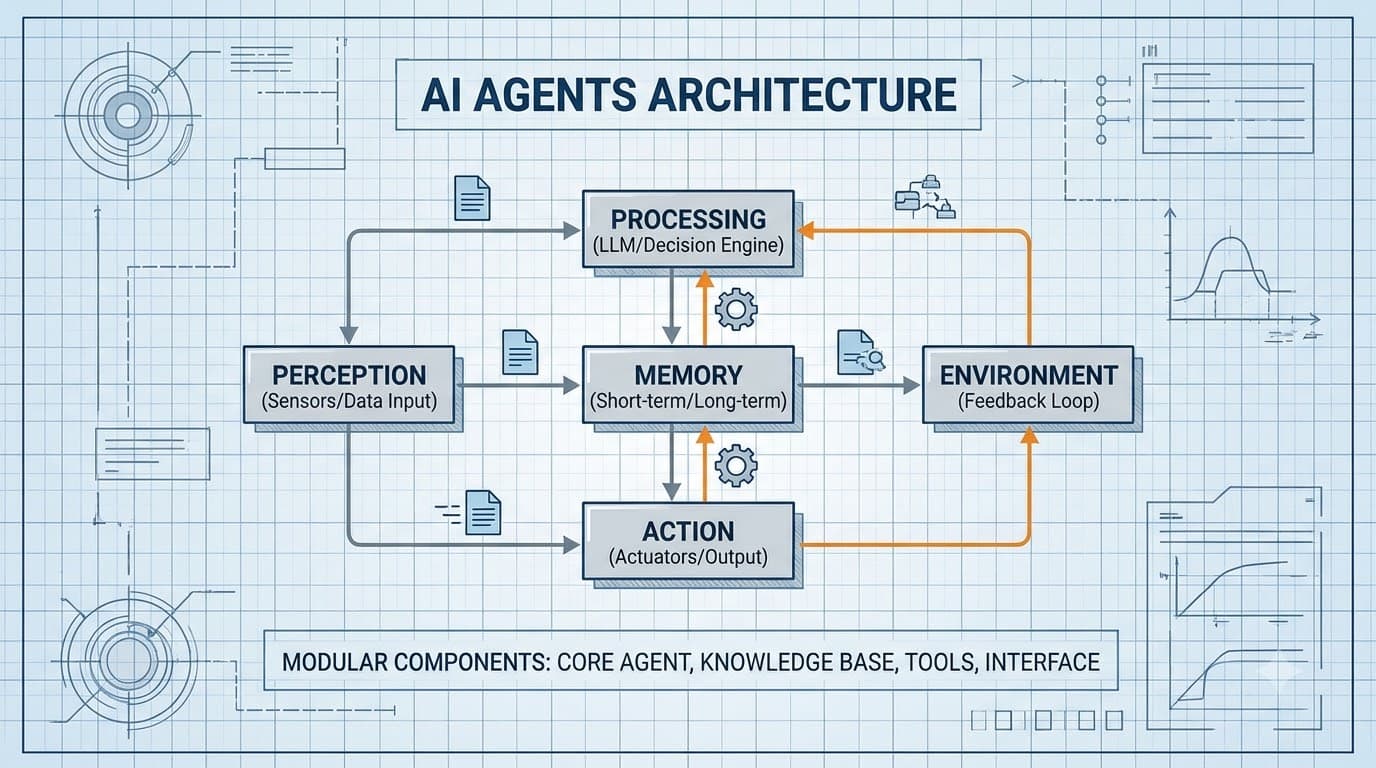

Table of Contents
「AIエージェントがあらゆるものを変革する」といったエッセイは山ほどありますが、これはその類ではありません。そうではなく、実際のAIエージェントシステムを構築する際に下す具体的なアーキテクチャ上の決定と、それらを怠ると陥る失敗モードについて見ていきましょう。
コアループ:ReActの実践
ほとんどのエージェントシステムは、ReActループ(Reason + Act)の何らかのバリエーションを使用しています。LLMは最終的な回答に到達するまで、thought → action → observationの連鎖を出力します。Anthropic APIを使用した最小限の実装を以下に示します。
import anthropic
import json
from typing import Any

client = anthropic.Anthropic()

TOOLS = [
    {
        "name": "search_codebase",
        "description": "Search for a pattern in the codebase. Returns matching file paths and line numbers.",
        "input_schema": {
            "type": "object",
            "properties": {
                "query": {"type": "string", "description": "Search query or regex pattern"},
                "file_pattern": {"type": "string", "description": "Glob pattern like '**/*.py'", "default": "**/*"}
            },
            "required": ["query"]
        }
    },
    {
        "name": "read_file",
        "description": "Read a file's contents.",
        "input_schema": {
            "type": "object",
            "properties": {"path": {"type": "string"}},
            "required": ["path"]
        }
    },
    {
        "name": "run_tests",
        "description": "Run the test suite. Returns exit code and stdout.",
        "input_schema": {
            "type": "object",
            "properties": {"test_path": {"type": "string", "default": "tests/"}},
            "required": []
        }
    }
]

def run_agent(task: str, max_iterations: int = 10) -> str:
    messages = [{"role": "user", "content": task}]

    for i in range(max_iterations):
        response = client.messages.create(
            model="claude-opus-4-5",
            max_tokens=4096,
            tools=TOOLS,
            messages=messages
        )

        # Append assistant turn
        messages.append({"role": "assistant", "content": response.content})

        if response.stop_reason == "end_turn":
            # Extract final text
            for block in response.content:
                if hasattr(block, "text"):
                    return block.text
            return "No result"

        if response.stop_reason == "tool_use":
            tool_results = []
            for block in response.content:
                if block.type == "tool_use":
                    result = dispatch_tool(block.name, block.input)
                    tool_results.append({
                        "type": "tool_result",
                        "tool_use_id": block.id,
                        "content": str(result)
                    })
            messages.append({"role": "user", "content": tool_results})

    return "Max iterations reached"

def dispatch_tool(name: str, inputs: dict) -> Any:
    match name:
        case "search_codebase":
            return search_codebase(inputs["query"], inputs.get("file_pattern", "**/*"))
        case "read_file":
            return read_file(inputs["path"])
        case "run_tests":
            return run_tests(inputs.get("test_path", "tests/"))
        case _:
            return f"Unknown tool: {name}"
これは骨格です。実際の作業は、dispatch_toolの中に何を入れるか、そして失敗をどのように処理するかにあります。
メモリ・アーキテクチャ:実際に機能するもの
メモリの問題は本当に難しいです。エージェントが過去の実行から関連するコンテキストを「記憶」する必要がある一方で、すべてのリクエストに5万トークンを詰め込むわけにはいきません。
ワーキングメモリ(インコンテキスト)
現在のコンテキストウィンドウ内にあるものすべて。高速で取得コストはかかりませんが、限定的で一時的です。構造化された状態追跡を使用します。
from dataclasses import dataclass, field
from typing import Optional

@dataclass
class AgentState:
    task: str
    completed_steps: list[str] = field(default_factory=list)
    discovered_facts: list[str] = field(default_factory=list)
    current_hypothesis: Optional[str] = None
    open_questions: list[str] = field(default_factory=list)
    iterations: int = 0

    def to_context_block(self) -> str:
        lines = [
            f"Task: {self.task}",
            f"Completed steps: {', '.join(self.completed_steps) or 'none'}",
            f"Key facts: {'; '.join(self.discovered_facts) or 'none'}",
        ]
        if self.current_hypothesis:
            lines.append(f"Current hypothesis: {self.current_hypothesis}")
        if self.open_questions:
            lines.append(f"Still need to check: {', '.join(self.open_questions)}")
        return "\n".join(lines)
各イテレーションでシステムプロンプトにstate.to_context_block()を挿入します。これにより、エージェントがすでに検証したことを「忘れる」のを防ぎます。
長期記憶(ベクトルストア)
関連する過去のインタラクションや知識の取得に使用します。pgvectorを使用する場合:
import psycopg2
import numpy as np
from anthropic import Anthropic

client = Anthropic()

def embed(text: str) -> list[float]:
    # Use a dedicated embedding model
    response = client.embeddings.create(
        model="voyage-3",
        input=text
    )
    return response.embeddings[0]

def store_memory(conn, content: str, metadata: dict):
    vector = embed(content)
    with conn.cursor() as cur:
        cur.execute(
            "INSERT INTO agent_memory (content, embedding, metadata) VALUES (%s, %s, %s)",
            (content, np.array(vector), json.dumps(metadata))
        )
    conn.commit()

def recall(conn, query: str, limit: int = 5) -> list[str]:
    vector = embed(query)
    with conn.cursor() as cur:
        cur.execute(
            """
            SELECT content, 1 - (embedding <=> %s::vector) AS similarity
            FROM agent_memory
            ORDER BY embedding <=> %s::vector
            LIMIT %s
            """,
            (np.array(vector), np.array(vector), limit)
        )
        return [row[0] for row in cur.fetchall() if row[1] > 0.75]
各エージェントの実行前にrecall()を呼び出し、上位の結果をシステムプロンプトに挿入します。これは安価で、通常は1〜3回のデータベースクエリで済みます。
ツール設計:ほとんどのエージェントが破綻する場所
エージェントの失敗の最大の原因はLLMではなく、設計の悪いツールです。失敗を引き起こす3つのパターンを挙げます。
1. 返しすぎるツール
# Bad: returns 10,000 lines of log
def get_logs() -> str:
    return open("/var/log/app.log").read()

# Good: returns relevant slice
def get_logs(since_minutes: int = 10, filter_pattern: str = "ERROR") -> str:
    import subprocess
    result = subprocess.run(
        ["journalctl", "-u", "app", f"--since={since_minutes} min ago",
         "--grep", filter_pattern, "-n", "50"],
        capture_output=True, text=True
    )
    return result.stdout or "No matching log lines"
エージェントは、与えられたすべての情報に基づいて推論しようとします。巨大なツール出力は、コンテキストのオーバーフローを引き起こすか、実際のシグナルからエージェントの注意をそらします。
2. エラー構造のないツール
# Bad: raises exception → agent sees a stack trace and panics
def query_database(sql: str) -> list[dict]:
    conn = get_conn()
    return conn.execute(sql).fetchall()  # might throw

# Good: structured error returns
def query_database(sql: str) -> dict:
    try:
        conn = get_conn()
        rows = conn.execute(sql).fetchall()
        return {"ok": True, "rows": rows, "count": len(rows)}
    except Exception as e:
        return {"ok": False, "error": str(e), "hint": "Check SQL syntax and table names"}
構造化されたエラーにより、エージェントは修正されたクエリで再試行できます。生の例外は、エージェントをループさせたり、諦めさせたりします。
3. 副作用ラベルのないツール
破壊的なツールは明示的にマークします。
TOOLS = [
    {
        "name": "run_query",
        "description": "Execute a READ-ONLY SQL query. SELECT statements only. Will reject writes.",
        ...
    },
    {
        "name": "execute_migration",
        "description": "⚠️ DESTRUCTIVE: Runs a database migration. Requires explicit confirmation from the user before calling. Do not call unless user has confirmed they want to proceed.",
        ...
    }
]
説明に直接このフレーズを入れることで、意図しない破壊的なアクションを大幅に減らすことができます。
マルチエージェント連携:機能する最もシンプルなパターン
すぐに本格的なオーケストレーションフレームワークに手を出す必要はありません。シンプルなスーパーバイザー/ワーカーパターンでほとんどのケースに対応できます。
class TaskQueue:
    def __init__(self):
        self.pending: list[dict] = []
        self.results: dict[str, Any] = {}

    def add(self, task_id: str, task: dict):
        self.pending.append({"id": task_id, **task})

    def complete(self, task_id: str, result: Any):
        self.results[task_id] = result

def run_supervisor(objective: str) -> dict:
    queue = TaskQueue()

    # Supervisor agent decomposes the work
    decomposition = client.messages.create(
        model="claude-haiku-4-5",
        max_tokens=1024,
        system="You decompose tasks into independent parallel subtasks. Output JSON: {tasks: [{id, description, requires}]}",
        messages=[{"role": "user", "content": objective}]
    )
    plan = json.loads(decomposition.content[0].text)

    # Execute tasks in dependency order
    for task in plan["tasks"]:
        # Block on dependencies
        deps_done = all(d in queue.results for d in task.get("requires", []))
        if deps_done:
            result = run_agent(task["description"])
            queue.complete(task["id"], result)

    # Supervisor synthesizes
    synthesis = client.messages.create(
        model="claude-opus-4-5",
        max_tokens=2048,
        system="Synthesize the subtask results into a final answer.",
        messages=[{"role": "user", "content": json.dumps(queue.results)}]
    )
    return {"result": synthesis.content[0].text, "subtasks": queue.results}
これは80%のケースをカバーします。リトライロジック、再起動時の永続性、または並列実行が必要な場合は、適切なキュー(Redis、Celery)を追加します。
エージェントのテスト:実際にバグを捕捉するもの
個々のツールを単体テストするのは簡単です。エージェントの意思決定をテストするのはより困難です。最も有用なテストタイプは**軌跡テスト(trajectory testing)**です。これは、エージェントが期待されるチェックポイントを訪れることをアサートします。
import pytest

def test_agent_reads_file_before_editing():
    """Agent should always read a file before proposing edits to it."""
    task = "Fix the bug on line 42 of src/parser.py"
    tool_calls = []

    original_dispatch = dispatch_tool
    def tracking_dispatch(name, inputs):
        tool_calls.append(name)
        return original_dispatch(name, inputs)

    with patch("your_module.dispatch_tool", tracking_dispatch):
        run_agent(task)

    read_index = next((i for i, t in enumerate(tool_calls) if t == "read_file"), -1)
    edit_index = next((i for i, t in enumerate(tool_calls) if t == "edit_file"), -1)

    assert read_index != -1, "Agent never read the file"
    assert read_index < edit_index, "Agent edited without reading first"

def test_agent_terminates_within_budget():
    """Agent shouldn't loop indefinitely on a solvable task."""
    result = run_agent("What is the Python version in pyproject.toml?", max_iterations=5)
    assert result  # Got some answer
    assert "3." in result  # Looks like a version number
これらのテストは実際のモデルに対して実行されるため遅いですが、ツール呼び出しの順序、無限ループ、的外れな最終回答など、重要な失敗モードを捕捉します。
こちらもおすすめ
Free In-Browser Developer Tools
Clean AI CLI logs, build cron expressions, decode JWTs, and calculate chmod permissions offline.
Related Articles
13日間のクラウドスプリント:期限切れGCPクレジットを永続的なメンテナンス費用ゼロのアセットに変える方法
期限切れのGoogleCloudクレジットから最大のROIを引き出すための実践ガイド。一時的なコンピューティングを、期限切れ後のコストゼロで永続的なSEOコンテンツ、ニューラルオーディオ、事前計算済みデータセットに変換する方法を学びましょう。
Read more
本番RAG向けVectorDatabase (2026): Pinecone vs Qdrant vs Milvus vs pgvector
本番RAGパイプライン向けにPinecone、Qdrant、Milvus、pgvectorのアーキテクチャを、HNSW vs IVFFlatインデックス、単段フィルタリング検索、p95レイテンシ、メモリフットプリントでベンチマークします。
Read more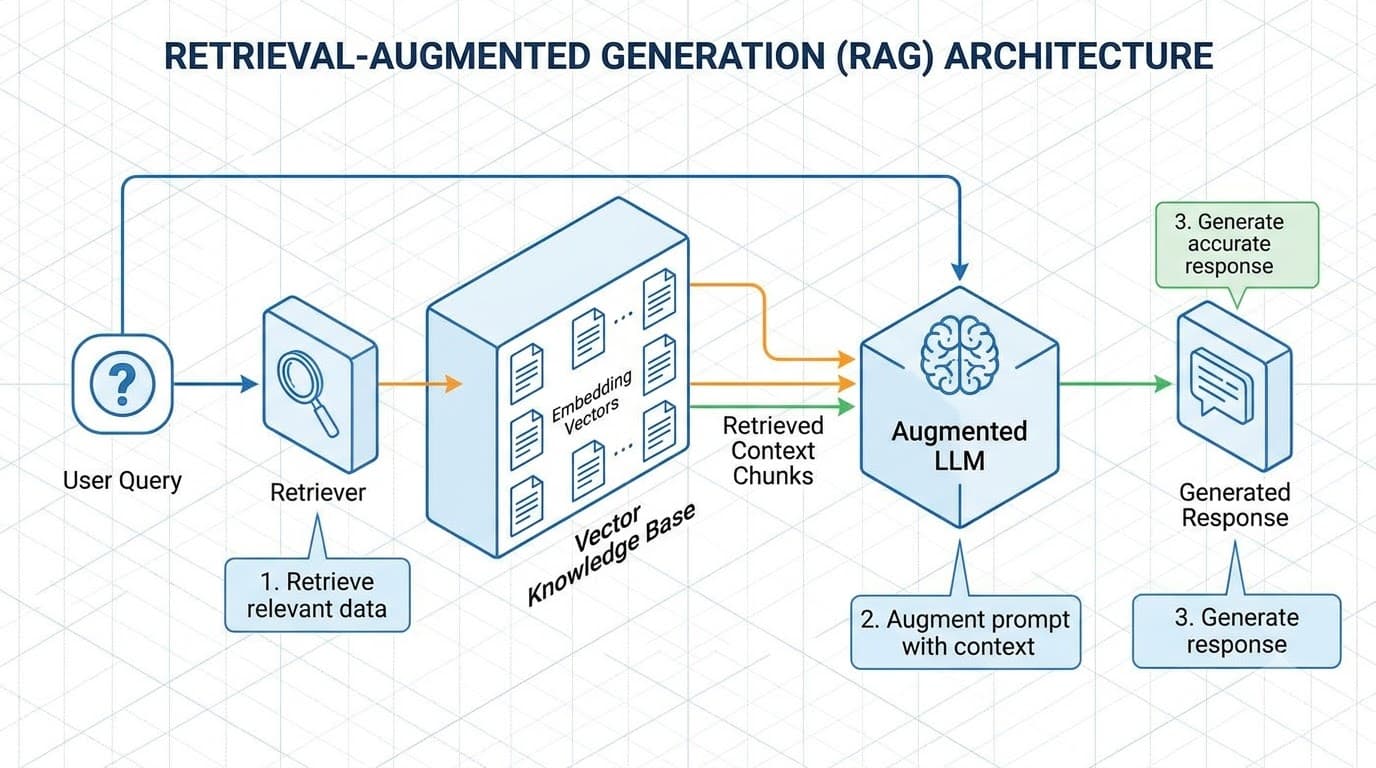
Retrieval-Augmented Generation (RAG)を理解する
Retrieval-Augmented Generation (RAG)のチャンキング戦略、ベクトル埋め込み、ハイブリッド密疎検索、リランキングパイプラインについて深く掘り下げます。
Read more