BigQuery + Cloud Run: Building a Production Serverless Data Ingestion Pipeline

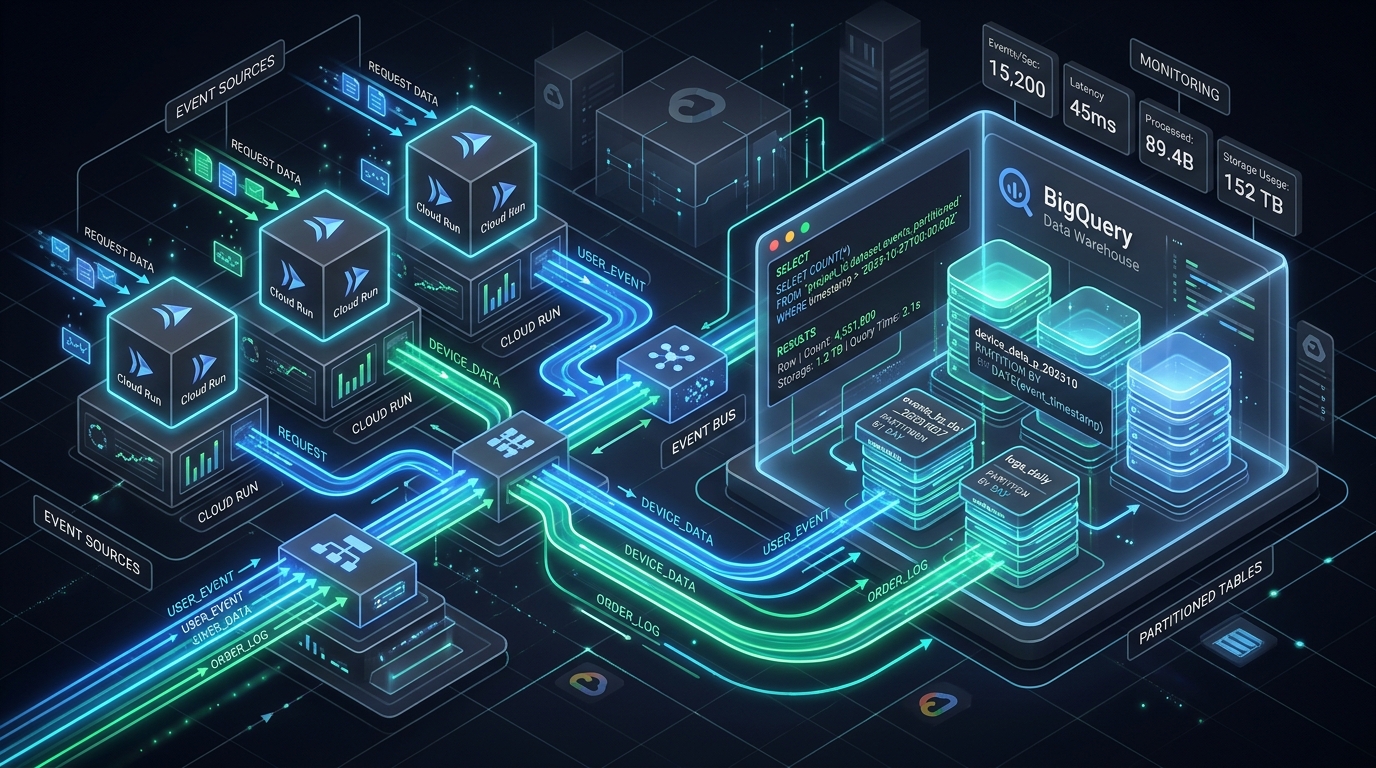
As a principal platform engineer, I've seen countless data ingestion pipelines, from the rickety to the robust. Building a production-grade system that handles high-volume, low-latency data streams reliably and cost-effectively is a non-trivial challenge. This article details a serverless approach using Google Cloud's BigQuery and Cloud Run, leveraging the BigQuery Storage Write API to achieve an ingestion pipeline that is scalable, resilient, and optimized for both performance and cost.
This guide is for senior backend and data engineers who need to understand the nuances of building such a system, from architectural decisions to specific implementation details, cost implications, and operational hardening.
BigQuery Query Cost & Slot Estimator
Estimate on-demand TB pricing & compute slots before querying
Calculate BigQuery query costs across regions, partition pruning savings, and slot-hour commitments before running expensive analytical warehouse queries.
1. Architecture Overview: Serverless Data Ingestion
Our serverless data ingestion pipeline is designed for high-throughput, low-latency event processing, delivering data reliably into BigQuery for analytics. The core principle is to leverage managed services to minimize operational overhead and maximize scalability.
Here's the end-to-end flow:
- Event Source: Any application or service generating data (e.g., webhooks, IoT devices, internal microservices).
- Publisher (Optional but Recommended): Events are published to a Pub/Sub topic. This provides decoupling, buffering, and built-in retry mechanisms, enhancing reliability and handling bursts. For direct HTTP ingestion, this layer is skipped.
- Cloud Run Receiver: A stateless HTTP service (implemented with FastAPI) deployed on Cloud Run. It receives events (either directly via HTTP or pulled from Pub/Sub via a push subscription), validates them, and then streams them to BigQuery.
- BigQuery Storage Write API: The Cloud Run service uses the BigQuery Storage Write API for efficient, reliable, and exactly-once data ingestion into BigQuery.
- BigQuery Table: Data lands in a BigQuery table, typically partitioned by event time and clustered by relevant dimensions, optimizing query performance and reducing costs.
- Downstream Consumers: Once in BigQuery, data is available for analytics, dashboards (Looker Studio, Power BI), machine learning models, or further transformations (dbt, Dataflow).
+----------------+       +-----------+       +---------------+       +---------------------+       +----------------+       +-------------------+
|                |       |           |       |               |       |                     |       |                |       |                   |
|  Event Source  +------>|  Pub/Sub  +------>|  Cloud Run    +------>|  BigQuery Storage   +------>|  BigQuery      +------>|  Downstream       |
| (Application,  |       |   Topic   |       |  (FastAPI     |       |    Write API        |       |  Table         |       |  Consumers        |
|  IoT, Webhook) |       |           |       |   Receiver)   |       |                     |       | (Partitioned,  |       | (Analytics, ML,   |
|                |       |           |       |               |       |                     |       |  Clustered)    |       |  Dashboards)      |
+----------------+       +-----------+       +---------------+       +---------------------+       +----------------+       +-------------------+
        ^                                            |                                                      ^
        |                                            |                                                      |
        |                                            +------------------------------------------------------+
        |                                                    (Error Handling, DLQ, Monitoring)
        |
        +-----------------------------------------------------------------------------------------------------
                                                              (Direct HTTP Ingestion - bypasses Pub/Sub)
This architecture is entirely serverless, meaning no servers to provision, patch, or manage. Scaling is automatic, driven by demand.
2. The BigQuery Storage Write API: Streaming Done Right
For high-volume, real-time data ingestion into BigQuery, the Storage Write API is the definitive choice. It supersedes older methods like the legacy JSON streaming inserts (which are still available but generally discouraged for new, high-performance pipelines) and batch loading via Cloud Storage.
Why Storage Write API Beats Legacy Streaming
The legacy JSON streaming insert API (tabledata.insertAll) has several limitations:
- Cost: It's more expensive per row.
- Throughput: Lower throughput limits.
- Reliability: Best-effort semantics, requiring client-side deduplication for exactly-once processing.
- Schema Evolution: Less flexible, requiring careful handling of schema changes.
The BigQuery Storage Write API addresses these shortcomings:
- Cost-Efficiency: Generally more cost-effective, especially at scale.
- Higher Throughput: Designed for massive data ingestion rates.
- Exactly-Once Semantics: Crucially, it supports exactly-once delivery within a stream, eliminating the need for client-side deduplication.
- Schema Evolution: Better handling of schema updates (e.g., adding nullable columns).
- Type Safety: Uses Avro or Protobuf for data serialization, offering stronger type checking than raw JSON. While the API supports JSON payload, using Avro/Protobuf is recommended for optimal performance and schema validation. For simplicity in this article, we'll focus on the JSON stream format which is easier to integrate with typical HTTP services.
- Offset-based Replay: Enables reliable recovery from transient errors.
The JSON Stream Format
When using the Storage Write API with JSON, data is sent as a list of JSON objects within the json_rows field of an AppendRowsRequest. Each object represents a row. The API automatically maps these JSON fields to BigQuery table columns based on their names.
Example AppendRowsRequest payload (simplified for conceptual understanding):
{
  "writeStream": "projects/my-project/datasets/my_dataset/tables/my_table/streams/my_stream_id",
  "offset": {
    "value": "123"
  },
  "jsonRows": {
    "rows": [
      {"event_id": "abc-123", "event_timestamp": "2023-10-27T10:00:00Z", "payload": {"user_id": 123, "action": "click"}},
      {"event_id": "def-456", "event_timestamp": "2023-10-27T10:00:01Z", "payload": {"user_id": 456, "action": "view"}}
    ]
  }
}
Append-Rows Stream Naming Rules
The Storage Write API uses streams to manage data ingestion. There are two primary types of streams, differentiated by their naming conventions and guarantees:
_defaultstream: This is the default, unbuffered stream. It provides at-most-once semantics. EachAppendRowsRequestimmediately writes data to BigQuery. If a request fails, the data is lost unless the client retries. There's no built-in deduplication. This is generally not recommended for mission-critical data._append_streams (e.g.,_append_stream_id): These are buffered streams that provide exactly-once semantics. When you create a stream with a custom ID starting with_append_, the API buffers data internally. You must explicitly callWriteStream.Finalize()andWriteStream.Commit()to make the data visible. The key advantage is that you can specify anoffsetin yourAppendRowsRequest. If a request fails, you can retry it with the same offset, and the API will ensure the data is written exactly once. This is the recommended approach for reliable ingestion.
For this article, we focus on _append_ streams due to their superior reliability and exactly-once guarantees.
Offset-Based Replay and Exactly-Once Semantics
The offset field in AppendRowsRequest is fundamental to exactly-once delivery. When you append rows to an _append_ stream, you provide an expected offset. The BigQuery service responds with the actual offset of the first row written in the AppendRowsResponse.
- Client Responsibility: The client must maintain the current
offsetfor each stream. When sending a batch of rows, theoffsetshould be the number of rows successfully written before the current batch. - Retry Mechanism: If an
AppendRowsRequestfails (e.g., network error, transient BigQuery error), the client can safely retry the entire batch with the same offset. The Storage Write API will detect if the data for that offset has already been written and will simply acknowledge it, preventing duplicates. - Stream Finalization & Commitment: For
_append_streams, data is only visible for querying after the stream is finalized and committed. This allows you to group multipleAppendRowsRequestcalls into a single atomic transaction.
Client Libraries
Google Cloud provides idiomatic client libraries for the Storage Write API in several languages:
- Go:
cloud.google.com/go/bigquery/storage/apiv1 - Java:
com.google.cloud:google-cloud-bigquery-storage - Python:
google-cloud-bigquery-storage - Node.js:
@google-cloud/bigquery-storage
These libraries abstract away much of the gRPC complexity, providing higher-level APIs for stream management and data appending.
Real Code Example (Python)
This Python example demonstrates how to use the BigQuery Storage Write API to create an _append_ stream and append rows.
import json
import time
from google.cloud import bigquery_storage_v1
from google.cloud.bigquery_storage_v1 import types
from google.cloud.bigquery_storage_v1 import writer

def append_rows_to_bq_stream(
    project_id: str,
    dataset_id: str,
    table_id: str,
    rows: list[dict] # List of dictionaries, each representing a row
):
    """Appends rows to a BigQuery table using the Storage Write API."""

    client = bigquery_storage_v1.BigQueryWriteClient()
    table_path = client.table_path(project_id, dataset_id, table_id)

    # Create a write stream.
    # Use the 'PENDING' type for exactly-once semantics and explicit commit.
    write_stream = types.WriteStream(type_=types.WriteStream.Type.PENDING)
    write_stream = client.create_write_stream(
        parent=table_path, write_stream=write_stream
    )
    stream_name = write_stream.name
    print(f"Created write stream: {stream_name}")

    # Create a JSON stream writer.
    # This writer manages the connection and sends batches.
    # The `offset` is managed internally by the writer for exactly-once delivery.
    json_stream_writer = writer.JsonStreamWriter(
        client,
        stream_name,
        # The schema of the table. The Storage Write API uses this to validate
        # and correctly parse JSON rows.
        # It's crucial to provide the correct schema.
        table_schema={
            "fields": [
                {"name": "event_id", "type": "STRING", "mode": "REQUIRED"},
                {"name": "event_timestamp", "type": "TIMESTAMP", "mode": "REQUIRED"},
                {"name": "user_id", "type": "INTEGER", "mode": "NULLABLE"},
                {"name": "action", "type": "STRING", "mode": "NULLABLE"},
                {"name": "payload", "type": "JSON", "mode": "NULLABLE"}
            ]
        }
    )

    # Append rows. The writer handles batching and sending.
    # It also manages the offset for exactly-once semantics.
    try:
        # The `append_rows` method returns a future.
        # We wait for it to complete to ensure the write is acknowledged.
        # In a real application, you might manage these futures asynchronously.
        append_future = json_stream_writer.append_rows(rows)
        response = append_future.result() # Blocks until response is received

        if response.row_errors:
            print(f"Row errors encountered: {response.row_errors}")
        else:
            print(f"Successfully appended {len(rows)} rows to stream {stream_name} at offset {response.append_result.offset.value}")

    except Exception as e:
        print(f"Error appending rows: {e}")
        # In a real system, you'd handle this more robustly,
        # potentially retrying or sending to a DLQ.
        client.batch_finalize_write_stream(names=[stream_name]) # Finalize to release resources
        raise

    finally:
        # Finalize the stream. This makes the buffered data visible.
        # For PENDING streams, data is only visible after commit.
        # For COMMITTED streams (not used here), data is visible immediately.
        client.finalize_write_stream(name=stream_name)
        print(f"Finalized write stream: {stream_name}")

        # Commit the stream. This is required for PENDING streams
        # to make the data permanent.
        batch_commit_write_streams_request = types.BatchCommitWriteStreamsRequest()
        batch_commit_write_streams_request.parent = table_path
        batch_commit_write_streams_request.write_streams.append(stream_name)
        client.batch_commit_write_streams(batch_commit_write_streams_request)
        print(f"Committed write stream: {stream_name}")

# Example usage:
if __name__ == "__main__":
    PROJECT_ID = "your-gcp-project-id"
    DATASET_ID = "your_dataset"
    TABLE_ID = "your_table"

    sample_rows = [
        {"event_id": "uuid-1", "event_timestamp": "2023-10-27T10:00:00.123456Z", "user_id": 1, "action": "login", "payload": {"ip": "1.1.1.1"}},
        {"event_id": "uuid-2", "event_timestamp": "2023-10-27T10:00:01.678901Z", "user_id": 2, "action": "logout", "payload": {"duration_s": 600}},
    ]

    # Ensure the table and dataset exist before running this.
    # The table schema should match the fields provided to JsonStreamWriter.
    append_rows_to_bq_stream(PROJECT_ID, DATASET_ID, TABLE_ID, sample_rows)
Key Takeaways from the Code:
WriteStream.Type.PENDING: This is crucial for exactly-once semantics. Data is buffered and only made visible after explicitfinalize_write_streamandbatch_commit_write_streams.JsonStreamWriter: This helper class simplifies managing the stream, batching rows, and handling offsets.- Schema Definition: Providing
table_schematoJsonStreamWriteris vital for correct parsing and validation of JSON rows. - Error Handling: The
try...except...finallyblock demonstrates how to handle potential errors during appending and ensures streams are finalized/committed. In production, you'd implement more sophisticated retry logic and potentially a Dead Letter Queue (DLQ) for unrecoverable errors.
3. Partitioning and Clustering: Optimizing BigQuery
BigQuery's power lies in its ability to scan massive datasets quickly. Partitioning and clustering are fundamental techniques to optimize query performance and reduce costs by minimizing the amount of data scanned.
Partitioning: Segmenting Data
Partitioning divides a table into smaller, more manageable segments based on the value of a specific column or ingestion time. Queries that filter on the partitioning column will only scan relevant partitions, significantly reducing data processed.
-
Ingestion-time Partitioning:
- Mechanism: BigQuery automatically partitions data based on the time it is ingested into the table.
- Pseudo-columns: Uses
_PARTITIONTIME(TIMESTAMP) or_PARTITIONDATE(DATE) pseudo-columns. - Use Case: Ideal when event time is not available or reliable, or when you primarily query data based on when it arrived in BigQuery.
- Example:
PARTITION BY _PARTITIONDATE
-
Event-time Partitioning (Column-based):
- Mechanism: Partitions data based on a
TIMESTAMPorDATEcolumn within your table schema. This is the most common and recommended approach for event data. - Use Case: When you have a reliable event timestamp (e.g.,
event_timestamp,created_at) that accurately reflects when the event occurred. This allows queries to align with business logic timeframes. - Example:
PARTITION BY event_timestamp
- Mechanism: Partitions data based on a
Clustering: Sorting Data Within Partitions
Clustering sorts data within each partition based on the values of one or more specified columns. When queries filter or aggregate on these clustered columns, BigQuery can efficiently prune blocks of data that don't match the filter, further reducing scanned bytes.
- Mechanism: You specify up to four clustering columns. BigQuery physically co-locates rows with similar values in these columns.
- Why Clustering Beats Partitioning for Some Filter Shapes: Partitioning is effective for broad time-based filters. However, if you need to filter on a high-cardinality column within a specific time range (e.g.,
user_idordevice_id), clustering shines. A query likeSELECT * FROM my_table WHERE _PARTITIONDATE = '2023-10-27' AND user_id = 123will benefit immensely from both partitioning on_PARTITIONDATEand clustering onuser_id. - Integer-range Clustering: BigQuery supports clustering on
INTEGERcolumns. For example, if you haveuser_idas anINTEGER, clustering on it will group users together.
Partition Expiration
Partition expiration automatically deletes old partitions after a specified duration. This is crucial for managing data lifecycle, complying with retention policies, and controlling storage costs.
- Mechanism: You set a
partition_expiration_days(orpartition_expiration_microseconds) property when creating or updating a table. - Benefit: Reduces long-term storage costs and simplifies data retention management.
Cost/Latency Trade-offs
- Reduced Cost: Both partitioning and clustering reduce the amount of data BigQuery has to scan for many queries, directly translating to lower query costs (BigQuery charges for scanned data).
- Improved Latency: Less data scanned means faster query execution times.
- Ingestion Overhead: There's a minor overhead for BigQuery to maintain partitions and clusters, but this is negligible compared to the query cost and performance benefits.
- Small Partitions: Avoid creating too many very small partitions, as this can sometimes lead to metadata overhead. BigQuery handles this fairly well, but it's a consideration.
DDL Example
Here's a CREATE TABLE statement demonstrating event-time partitioning and clustering:
CREATE TABLE `your-gcp-project-id.your_dataset.your_table`
(
    event_id STRING NOT NULL OPTIONS(description="Unique identifier for the event"),
    event_timestamp TIMESTAMP NOT NULL OPTIONS(description="Timestamp when the event occurred"),
    user_id INTEGER OPTIONS(description="Identifier for the user"),
    session_id STRING OPTIONS(description="Identifier for the user session"),
    action STRING OPTIONS(description="Type of action performed"),
    payload JSON OPTIONS(description="JSON payload containing additional event details")
)
PARTITION BY DATE(event_timestamp) -- Partition by the date component of event_timestamp
CLUSTER BY user_id, session_id      -- Cluster within each partition by user_id and session_id
OPTIONS(
    description="Table for storing application events, partitioned by event date and clustered by user/session.",
    partition_expiration_days=90, -- Partitions older than 90 days will be automatically deleted
    require_partition_filter=true -- Enforce partition filtering in queries to prevent full table scans
);
Explanation:
PARTITION BY DATE(event_timestamp): Uses theevent_timestampcolumn to partition the table by day.CLUSTER BY user_id, session_id: Within each daily partition, data will be sorted and grouped byuser_idand thensession_id.partition_expiration_days=90: Any partition older than 90 days from its creation will be automatically removed.require_partition_filter=true: This is a critical option for cost control. It forces users to include a filter on_PARTITIONTIME(orevent_timestampin this case) in their queries, preventing accidental full table scans.
4. A FastAPI Async Receiver: The Ingestion Gateway
The Cloud Run receiver acts as the HTTP endpoint for our ingestion pipeline. FastAPI, with its async capabilities and Pydantic for data validation, is an excellent choice for building this service.
FastAPI Plus Async Context Managers
FastAPI naturally supports async/await, which is crucial for I/O-bound operations like writing to BigQuery. The google-cloud-bigquery-storage Python client library, however, is primarily synchronous. To use it efficiently in an async FastAPI application, we need to offload synchronous BigQuery calls to a thread pool or use asyncio.to_thread. More importantly, managing the BigQueryWriteClient and its underlying gRPC streams requires careful handling, especially for connection pooling and graceful shutdown.
Async context managers (async with) are ideal for this. They allow us to manage the lifecycle of BigQuery write streams, ensuring they are properly initialized and closed.
Connection Pooling
Creating a new BigQueryWriteClient and a new write stream for every incoming request is inefficient. It incurs connection setup overhead and doesn't leverage existing connections. A better approach is to:
- Reuse
BigQueryWriteClient: TheBigQueryWriteClientitself can be a singleton or created once per process. - Pool Write Streams: For
_append_streams, you can create a pool of long-lived streams. Each stream can handle multipleAppendRowsRequestcalls. When a request comes in, it picks an available stream from the pool, appends rows, and releases the stream back to the pool. This minimizes stream creation/finalization overhead. For simplicity in the example, we'll create a stream per batch, but a more advanced approach would involve pooling.
Backpressure
Handling backpressure is critical when your ingestion rate exceeds your processing capacity or BigQuery's write limits.
- Internal Queues: FastAPI can use internal queues (e.g.,
asyncio.Queue) to buffer incoming requests before processing. If the queue fills up, new requests can be rejected with a503 Service Unavailable. - Cloud Run Auto-scaling: Cloud Run automatically scales instances, which helps. However, if a single instance is overwhelmed, internal queues provide a buffer.
- BigQuery Quotas: BigQuery has quotas on streaming inserts. If you hit these, the Storage Write API client will typically retry, but sustained quota breaches require intervention (e.g., increasing quotas or throttling upstream).
Graceful Shutdown of In-flight Streams
When a Cloud Run instance is terminated (e.g., scaling down, deployment), it receives a SIGTERM signal. The application needs to handle this gracefully:
- Stop accepting new requests.
- Process existing in-flight requests: Allow current
AppendRowsRequestcalls to complete. - Finalize and commit any open
_append_streams: This ensures all buffered data is flushed to BigQuery. If not done, data in pending streams might be lost or delayed.
FastAPI's lifespan event handler is perfect for this.
Cloud Run Concurrency Tuning
Cloud Run offers several parameters to optimize performance and cost:
concurrency: The maximum number of concurrent requests an instance can handle. A higher concurrency (e.g., 80-250) is generally good for I/O-bound services like our receiver, as long as your application is truly async and doesn't block.request timeouts: Set this high enough to accommodate BigQuery write latencies, especially for large batches, but not so high that failed requests linger. 60-120 seconds is a reasonable starting point.min-instances/max-instances:min-instanceskeeps a baseline number of instances warm, reducing cold start latency.max-instancescaps your spending and resource usage.- Streaming vs. Buffered Responses: For the ingestion receiver, we are primarily receiving data, not streaming responses back. The focus is on efficiently processing the incoming request body.
Idempotency Keys
Client-side retries are common. Without idempotency, a retried request could lead to duplicate data in BigQuery.
- Mechanism: The client sends a unique
Idempotency-Keyheader with each request. - Receiver Logic:
- Upon receiving a request, check if the
Idempotency-Keyhas been seen recently (e.g., in a Redis cache or a small in-memory cache). - If seen and still "processing", return a
202 Acceptedor409 Conflict(depending on desired behavior) without re-processing. - If seen and "processed successfully", return a
200 OKwithout re-processing. - If not seen, process the request, store the
Idempotency-Keywith its status, and return the result.
- Upon receiving a request, check if the
- BigQuery Storage Write API and Idempotency: The Storage Write API's offset-based replay provides idempotency within a single stream. However, application-level idempotency keys protect against duplicates if the entire request to Cloud Run is retried before the BigQuery write even starts or if a new stream is created. It's a complementary layer of protection.
Real Code Example (FastAPI)
This example shows a FastAPI receiver with a singleton BigQuery client, handling incoming JSON events, and writing them using the Storage Write API.
import os
import asyncio
import logging
from contextlib import asynccontextmanager
from typing import List, Dict, Any, Optional

from fastapi import FastAPI, Request, HTTPException, status
from pydantic import BaseModel, Field
from google.cloud import bigquery_storage_v1
from google.cloud.bigquery_storage_v1 import types
from google.cloud.bigquery_storage_v1 import writer
from concurrent.futures import ThreadPoolExecutor

# --- Configuration ---
PROJECT_ID = os.environ.get("GCP_PROJECT_ID")
DATASET_ID = os.environ.get("BQ_DATASET_ID")
TABLE_ID = os.environ.get("BQ_TABLE_ID")
BIGQUERY_TABLE_SCHEMA = {
    "fields": [
        {"name": "event_id", "type": "STRING", "mode": "REQUIRED"},
        {"name": "event_timestamp", "type": "TIMESTAMP", "mode": "REQUIRED"},
        {"name": "user_id", "type": "INTEGER", "mode": "NULLABLE"},
        {"name": "action", "type": "STRING", "mode": "NULLABLE"},
        {"name": "payload", "type": "JSON", "mode": "NULLABLE"}
    ]
}
MAX_BIGQUERY_STREAM_IDLE_SECONDS = 300 # Close streams if idle for too long
MAX_BIGQUERY_STREAM_BATCH_SIZE = 1000 # Max rows per append call
MAX_BIGQUERY_STREAM_BATCH_BYTES = 10 * 1024 * 1024 # 10MB per append call
MAX_WORKER_THREADS = 5 # For offloading synchronous BigQuery calls

# --- Logging ---
logging.basicConfig(level=logging.INFO)
logger = logging.getLogger(__name__)

# --- Global BigQuery Client and Thread Pool ---
# We use a global client and thread pool to reuse resources efficiently.
bq_storage_client: Optional[bigquery_storage_v1.BigQueryWriteClient] = None
bq_executor: Optional[ThreadPoolExecutor] = None

# --- Pydantic Models for Request Validation ---
class EventPayload(BaseModel):
    ip: Optional[str] = None
    duration_s: Optional[int] = None
    # Add other dynamic fields as needed. Use Any for truly flexible JSON.
    # For strict validation, define all expected fields.

class Event(BaseModel):
    event_id: str = Field(..., description="Unique identifier for the event")
    event_timestamp: str = Field(..., description="ISO 8601 timestamp of the event")
    user_id: Optional[int] = Field(None, description="User ID associated with the event")
    action: Optional[str] = Field(None, description="Action performed by the user")
    payload: Optional[EventPayload] = Field(None, description="Additional event details")

# --- FastAPI Lifespan Management ---
@asynccontextmanager
async def lifespan(app: FastAPI):
    global bq_storage_client, bq_executor
    logger.info("Starting up Cloud Run receiver...")

    if not all([PROJECT_ID, DATASET_ID, TABLE_ID]):
        logger.error("Missing required environment variables for BigQuery connection.")
        raise RuntimeError("BigQuery environment variables not set.")

    bq_storage_client = bigquery_storage_v1.BigQueryWriteClient()
    bq_executor = ThreadPoolExecutor(max_workers=MAX_WORKER_THREADS)
    logger.info("BigQueryWriteClient and ThreadPoolExecutor initialized.")

    yield # Application runs

    logger.info("Shutting down Cloud Run receiver...")
    if bq_storage_client:
        # In a real scenario, you'd manage open write streams here.
        # For this simple example, we assume streams are short-lived per request.
        # If using long-lived pooled streams, you'd finalize/commit them here.
        bq_storage_client.transport.close() # Close gRPC connections
        logger.info("BigQueryWriteClient closed.")
    if bq_executor:
        bq_executor.shutdown(wait=True)
        logger.info("ThreadPoolExecutor shut down.")
    logger.info("Cloud Run receiver shut down complete.")

app = FastAPI(
    title="BigQuery Serverless Ingestion Receiver",
    description="Receives events and streams them to BigQuery via Storage Write API.",
    version="1.0.0",
    lifespan=lifespan
)

# --- Idempotency Cache (In-memory for simplicity, use Redis for production) ---
# This is a very basic in-memory cache. For production, use a distributed cache like Redis.
# Stores {idempotency_key: (status, timestamp)}
IDEMPOTENCY_CACHE: Dict[str, tuple[str, float]] = {}
IDEMPOTENCY_CACHE_EXPIRATION_SECONDS = 3600 # 1 hour

def check_idempotency(idempotency_key: str) -> Optional[str]:
    """Checks idempotency cache. Returns 'processed' if seen, None otherwise."""
    if idempotency_key in IDEMPOTENCY_CACHE:
        status, timestamp = IDEMPOTENCY_CACHE[idempotency_key]
        if time.time() - timestamp < IDEMPOTENCY_CACHE_EXPIRATION_SECONDS:
            logger.info(f"Idempotent request detected for key: {idempotency_key}. Status: {status}")
            return status
        else:
            # Expired entry, remove it
            del IDEMPOTENCY_CACHE[idempotency_key]
    return None

def set_idempotency_status(idempotency_key: str, status: str):
    """Sets idempotency status."""
    IDEMPOTENCY_CACHE[idempotency_key] = (status, time.time())

# --- BigQuery Write Function (Synchronous, to be run in thread pool) ---
def _write_to_bigquery_sync(
    client: bigquery_storage_v1.BigQueryWriteClient,
    table_path: str,
    rows_to_insert: List[Dict[str, Any]]
):
    """Synchronously writes rows to BigQuery using Storage Write API."""
    write_stream = client.create_write_stream(
        parent=table_path, write_stream=types.WriteStream(type_=types.WriteStream.Type.PENDING)
    )
    stream_name = write_stream.name
    logger.info(f"Created write stream: {stream_name}")

    json_stream_writer = writer.JsonStreamWriter(
        client,
        stream_name,
        table_schema=BIGQUERY_TABLE_SCHEMA
    )

    try:
        append_future = json_stream_writer.append_rows(rows_to_insert)
        response = append_future.result() # Blocks until response

        if response.row_errors:
            logger.error(f"Row errors for stream {stream_name}: {response.row_errors}")
            raise RuntimeError(f"BigQuery row errors: {response.row_errors}")
        else:
            logger.info(f"Successfully appended {len(rows_to_insert)} rows to stream {stream_name} at offset {response.append_result.offset.value}")

    except Exception as e:
        logger.error(f"Failed to append rows to BigQuery stream {stream_name}: {e}")
        # Finalize to release resources even on error
        client.finalize_write_stream(name=stream_name)
        raise
    finally:
        # Finalize and commit the stream to make data visible
        client.finalize_write_stream(name=stream_name)
        commit_request = types.BatchCommitWriteStreamsRequest(
            parent=table_path,
            write_streams=[stream_name]
        )
        client.batch_commit_write_streams(commit_request)
        logger.info(f"Committed write stream: {stream_name}")


# --- FastAPI Endpoint ---
@app.post("/ingest")
async def ingest_events(request: Request, events: List[Event]):
    """
    Receives a batch of events and streams them to BigQuery.
    """
    idempotency_key = request.headers.get("Idempotency-Key")

    if idempotency_key:
        status_in_cache = check_idempotency(idempotency_key)
        if status_in_cache == "processed":
            return {"message": "Request already processed", "status": "idempotent_success"}
        elif status_in_cache == "processing":
            raise HTTPException(
                status_code=status.HTTP_409_CONFLICT,
                detail="Request with this Idempotency-Key is already being processed."
            )
        set_idempotency_status(idempotency_key, "processing")

    if not bq_storage_client or not bq_executor:
        logger.error("BigQuery client or executor not initialized.")
        raise HTTPException(
            status_code=status.HTTP_500_INTERNAL_SERVER_ERROR,
            detail="Service not ready."
        )

    table_path = bq_storage_client.table_path(PROJECT_ID, DATASET_ID, TABLE_ID)
    rows_to_insert = [event.model_dump(mode='json') for event in events]

    try:
        # Offload synchronous BigQuery write to a separate thread
        await asyncio.to_thread(
            _write_to_bigquery_sync,
            bq_storage_client,
            table_path,
            rows_to_insert
        )
        if idempotency_key:
            set_idempotency_status(idempotency_key, "processed")
        return {"message": f"Successfully ingested {len(events)} events."}
    except Exception as e:
        logger.error(f"Failed to ingest events: {e}", exc_info=True)
        if idempotency_key:
            set_idempotency_status(idempotency_key, "failed")
        raise HTTPException(
            status_code=status.HTTP_500_INTERNAL_SERVER_ERROR,
            detail=f"Failed to write to BigQuery: {e}"
        )

# Example of a health check endpoint
@app.get("/health")
async def health_check():
    return {"status": "ok"}
Cloud Run Specifics for Deployment:
To deploy this, you'd containerize it (e.g., using Gunicorn/Uvicorn within a Docker image) and deploy to Cloud Run.
# Use an official Python runtime as a parent image
FROM python:3.10-slim-buster

# Set the working directory in the container
WORKDIR /app

# Install dependencies
COPY requirements.txt .
RUN pip install --no-cache-dir -r requirements.txt

# Copy the application code
COPY . .

# Expose the port the app runs on
ENV PORT 8080

# Run the application with Uvicorn
CMD exec uvicorn main:app --host 0.0.0.0 --port $PORT --workers 1
requirements.txt:
fastapi
uvicorn[standard]
google-cloud-bigquery-storage
pydantic
Cloud Run Deployment Command (via gcloud):
gcloud run deploy bigquery-ingester \
  --image gcr.io/your-project-id/bigquery-ingester:latest \
  --platform managed \
  --region us-central1 \
  --allow-unauthenticated \
  --cpu 1 \
  --memory 2Gi \
  --concurrency 80 \
  --timeout 120s \
  --min-instances 1 \
  --max-instances 10 \
  --set-env-vars GCP_PROJECT_ID=your-project-id,BQ_DATASET_ID=your_dataset,BQ_TABLE_ID=your_table \
  --service-account bigquery-ingester-sa@your-project-id.iam.gserviceaccount.com
Key Cloud Run Tuning Parameters:
--concurrency 80: A good starting point for I/O-bound Python async applications. Adjust based on profiling.--timeout 120s: Allows for longer BigQuery write operations, especially for large batches.--min-instances 1: Keeps one instance warm to reduce cold start latency for critical ingestion.--max-instances 10: Sets an upper limit on scaling to control costs.
5. Terraform for the Whole Stack
Terraform provides Infrastructure as Code (IaC) for managing our entire pipeline. This ensures reproducibility, version control, and consistent deployments.
We'll define:
- Required Google Cloud APIs.
- A dedicated service account with least-privilege IAM roles.
- Pub/Sub topic for events and a Dead Letter Topic (DLT).
- Pub/Sub subscription (if events come from Pub/Sub).
- BigQuery dataset and the partitioned/clustered table.
- Cloud Run service for the FastAPI receiver.
- A minimal Cloud Run Job (v2 worker) for potential maintenance tasks (e.g., schema migration, data backfill).
# main.tf

# -----------------------------------------------------------------------------
# Provider and Configuration
# -----------------------------------------------------------------------------
terraform {
  required_providers {
    google = {
      source  = "hashicorp/google"
      version = "~> 5.0"
    }
  }
  required_version = ">= 1.0"
}

# Variables for project and region
variable "project_id" {
  description = "The GCP project ID."
  type        = string
}

variable "region" {
  description = "The GCP region for resources."
  type        = string
  default     = "us-central1"
}

variable "dataset_id" {
  description = "BigQuery Dataset ID for ingestion."
  type        = string
  default     = "event_data"
}

variable "table_id" {
  description = "BigQuery Table ID for ingested events."
  type        = string
  default     = "app_events"
}

variable "cloud_run_service_name" {
  description = "Name of the Cloud Run service."
  type        = string
  default     = "bigquery-ingester"
}

variable "cloud_run_job_name" {
  description = "Name of the Cloud Run Job (v2 worker)."
  type        = string
  default     = "bq-maintenance-job"
}

variable "image_tag" {
  description = "Docker image tag for the Cloud Run service/job."
  type        = string
  default     = "latest" # In production, use specific version tags like v1.0.0
}

# -----------------------------------------------------------------------------
# Enable Required APIs
# -----------------------------------------------------------------------------
resource "google_project_service" "apis" {
  for_each = toset([
    "run.googleapis.com",
    "pubsub.googleapis.com",
    "bigquery.googleapis.com",
    "bigqueryconnection.googleapis.com", # Required for Storage Write API
    "bigquerystorage.googleapis.com",    # Required for Storage Write API
    "artifactregistry.googleapis.com",   # For Docker image storage
    "cloudbuild.googleapis.com",         # If using Cloud Build for CI/CD
    "iam.googleapis.com"                 # For managing service accounts
  ])
  project = var.project_id
  service = each.key
  disable_on_destroy = false
}

# -----------------------------------------------------------------------------
# Service Account and IAM
# -----------------------------------------------------------------------------
resource "google_service_account" "ingester_sa" {
  project      = var.project_id
  account_id   = "bigquery-ingester-sa"
  display_name = "Service Account for BigQuery Ingestion Cloud Run Service"
}

# Grant BigQuery Data Editor role for writing to the table
resource "google_project_iam_member" "bq_data_editor" {
  project = var.project_id
  role    = "roles/bigquery.dataEditor" # Allows writing data to tables
  member  = "serviceAccount:${google_service_account.ingester_sa.email}"
}

# Grant Pub/Sub Publisher role if Cloud Run pushes to Pub/Sub (e.g., for DLQ)
# Or if Cloud Run pulls from Pub/Sub via subscription
resource "google_project_iam_member" "pubsub_publisher" {
  project = var.project_id
  role    = "roles/pubsub.publisher"
  member  = "serviceAccount:${google_service_account.ingester_sa.email}"
  # Comment out if Cloud Run only receives HTTP and doesn't publish to Pub/Sub
}

# Allow Cloud Run to invoke the service (for unauthenticated access, this is 'allUsers')
# If you want authenticated access, use `google_cloud_run_service_iam_member`
# and specify which service accounts or users can invoke it.
resource "google_cloud_run_service_iam_member" "allow_unauthenticated" {
  project  = var.project_id
  location = var.region
  service  = google_cloud_run_service.ingester_service.name
  role     = "roles/run.invoker"
  member   = "allUsers"
  # Remove this block or change 'allUsers' to specific service accounts for authenticated access.
}

# -----------------------------------------------------------------------------
# Pub/Sub Topics (Main and Dead Letter)
# -----------------------------------------------------------------------------
resource "google_pubsub_topic" "main_events_topic" {
  project = var.project_id
  name    = "main-events-topic"
}

resource "google_pubsub_topic" "dlq_events_topic" {
  project = var.project_id
  name    = "dlq-events-topic"
}

# Pub/Sub Subscription (if Cloud Run pulls from Pub/Sub)
# This example assumes direct HTTP ingestion, but if using Pub/Sub as input,
# you'd create a push subscription to the Cloud Run service here.
/*
resource "google_pubsub_subscription" "cloud_run_push_subscription" {
  project = var.project_id
  name    = "cloud-run-ingester-sub"
  topic   = google_pubsub_topic.main_events_topic.name

  ack_deadline_seconds = 600 # Adjust based on processing time
  message_retention_duration = "604800s" # 7 days

  push_config {
    push_endpoint = google_cloud_run_service.ingester_service.status[0].url
    oidc_token {
      service_account_email = google_service_account.ingester_sa.email
    }
  }

  # Enable Dead Letter Queue
  dead_letter_policy {
    dead_letter_topic     = google_pubsub_topic.dlq_events_topic.id
    max_delivery_attempts = 5
  }

  # Enable exactly-once delivery (requires corresponding client-side support)
  enable_exactly_once_delivery = true
}
*/

# -----------------------------------------------------------------------------
# BigQuery Dataset and Table
# -----------------------------------------------------------------------------
resource "google_bigquery_dataset" "event_dataset" {
  project    = var.project_id
  dataset_id = var.dataset_id
  location   = var.region
  description = "Dataset for storing application event data."
}

resource "google_bigquery_table" "events_table" {
  project    = var.project_id
  dataset_id = google_bigquery_dataset.event_dataset.dataset_id
  table_id   = var.table_id
  deletion_protection = false # Set to true in production for critical tables

  schema = jsonencode([
    {
      name        = "event_id"
      type        = "STRING"
      mode        = "REQUIRED"
      description = "Unique identifier for the event"
    },
    {
      name        = "event_timestamp"
      type        = "TIMESTAMP"
      mode        = "REQUIRED"
      description = "Timestamp when the event occurred"
    },
    {
      name        = "user_id"
      type        = "INTEGER"
      mode        = "NULLABLE"
      description = "Identifier for the user"
    },
    {
      name        = "session_id"
      type        = "STRING"
      mode        = "NULLABLE"
      description = "Identifier for the user session"
    },
    {
      name        = "action"
      type        = "STRING"
      mode        = "NULLABLE"
      description = "Type of action performed"
    },
    {
      name        = "payload"
      type        = "JSON"
      mode        = "NULLABLE"
      description = "JSON payload containing additional event details"
    }
  ])

  time_partitioning {
    type                    = "DAY"
    field                   = "event_timestamp"
    expiration_ms           = 90 * 24 * 60 * 60 * 1000 # 90 days in milliseconds
    require_partition_filter = true
  }

  clustering = ["user_id", "session_id"] # Order matters for clustering

  labels = {
    env = "production"
    app = "ingestion"
  }
}

# -----------------------------------------------------------------------------
# Cloud Run Service (FastAPI Receiver)
# -----------------------------------------------------------------------------
resource "google_cloud_run_service" "ingester_service" {
  project  = var.project_id
  location = var.region
  name     = var.cloud_run_service_name

  template {
    spec {
      service_account_name = google_service_account.ingester_sa.email
      containers {
        image = "gcr.io/${var.project_id}/${var.cloud_run_service_name}:${var.image_tag}"
        env {
          name  = "GCP_PROJECT_ID"
          value = var.project_id
        }
        env {
          name  = "BQ_DATASET_ID"
          value = google_bigquery_dataset.event_dataset.dataset_id
        }
        env {
          name  = "BQ_TABLE_ID"
          value = google_bigquery_table.events_table.table_id
        }
        resources {
          cpu_idle = true # Optimize for CPU usage when idle
          limits = {
            cpu    = "1000m" # 1 CPU
            memory = "2Gi"   # 2 GB RAM
          }
        }
      }
      container_concurrency = 80 # Max concurrent requests per instance
    }

    metadata {
      annotations = {
        "autoscaling.knative.dev/minScale" = "1"
        "autoscaling.knative.dev/maxScale" = "10"
        "run.googleapis.com/client-name" = "terraform"
        "run.googleapis.com/vpc-access-connector" = "" # If using VPC Access
        "run.googleapis.com/vpc-access-egress" = "all" # If using VPC Access
      }
    }
  }

  traffic {
    percent         = 100
    latest_revision = true
  }

  timeouts {
    create = "10m"
    update = "10m"
  }

  lifecycle {
    ignore_changes = [
      template[0].metadata[0].annotations["autoscaling.knative.dev/minScale"],
      template[0].metadata[0].annotations["autoscaling.knative.dev/maxScale"],
    ]
  }
}

# -----------------------------------------------------------------------------
# Cloud Run Job (v2 Worker - e.g., for schema migrations or backfills)
# -----------------------------------------------------------------------------
resource "google_cloud_run_v2_job" "bq_maintenance_job" {
  project  = var.project_id
  location = var.region
  name     = var.cloud_run_job_name

  template {
    template {
      service_account_name = google_service_account.ingester_sa.email
      containers {
        image = "gcr.io/${var.project_id}/${var.cloud_run_job_name}:${var.image_tag}"
        env {
          name  = "GCP_PROJECT_ID"
          value = var.project_id
        }
        env {
          name  = "BQ_DATASET_ID"
          value = google_bigquery_dataset.event_dataset.dataset_id
        }
        env {
          name  = "BQ_TABLE_ID"
          value = google_bigquery_table.events_table.table_id
        }
        resources {
          limits = {
            cpu    = "1000m"
            memory = "512Mi"
          }
        }
      }
      timeout = "3600s" # 1 hour timeout for the job
      task_count = 1 # Number of parallel tasks
    }
    # This example does not define an execution template directly,
    # as it's typically triggered manually or by Cloud Scheduler.
  }
  labels = {
    env = "production"
    app = "bq-maintenance"
  }
}
IAM Best Practices:
roles/bigquery.dataEditor: Grants permission to write data to BigQuery tables within the project. This is the minimum required for the Storage Write API.roles/run.invoker: AllowsallUsersto invoke the Cloud Run service. For internal services, restrict this to specific service accounts or users.roles/pubsub.publisher: Needed if the Cloud Run service publishes messages to Pub/Sub (e.g., to a DLQ).roles/pubsub.viewerandroles/pubsub.subscriber: If Cloud Run is configured to pull messages from a Pub/Sub subscription (not shown in the primary example, but commented out in Terraform).
6. Cost Breakdown
Understanding and optimizing costs is critical for production systems. Here's a breakdown of per-service unit costs and a worked example.
Per-Service Unit Costs (Approximate, as of late 2023 - always check GCP pricing!)
| Service Component | Unit Cost | Notes |
|---|---|---|
| Cloud Run | ||
| CPU (active) | $0.00002400 / vCPU-second | Only charged when processing requests. |
| CPU (idle) | $0.00000600 / vCPU-second | For min-instances. Lower rate for keeping instances warm. |
| Memory (active) | $0.00000250 / GiB-second | Only charged when processing requests. |
| Memory (idle) | $0.000000625 / GiB-second | For min-instances. |
| Requests | $0.40 / million requests | Includes HTTP requests. |
| Network Egress | 0.12 - 0.23 / GiB (tier-dependent) | Data leaving GCP. |
| Pub/Sub | ||
| Message Ingress/Egress | $40 / TiB | First 10 GiB/month free. Charged per message published/delivered. |
| Message Storage | $10 / GiB-month | For messages retained beyond 7 days (e.g., in DLQ or long retention subscriptions). |
| BigQuery | ||
| Storage Write API (SA) | $0.05 / GiB | Data written via Storage Write API. |
| Active Storage | $0.02 / GiB-month | For data in active storage. First 10 GiB/month free. |
| Long-Term Storage | $0.01 / GiB-month | For data untouched for 90 consecutive days. |
| Query On-Demand | $6.25 / TiB scanned | For analytical queries (first 1 TiB/month free). Not directly for ingestion, but for downstream. |
Worked Monthly Example
Let's assume a concrete volume:
- Volume: 100 million events per month.
- Event Size: Average 1 KB per event (after JSON serialization).
- Cloud Run: 1 vCPU, 2 GiB RAM,
concurrency80,min-instances1,max-instances10. - BigQuery: 90-day partition expiration.
1. Cloud Run Costs:
- Requests: 100,000,000 requests / 1,000,000 * 0.40 = 40.00
- Data Processed: 100M events * 1KB/event = 100 GiB. Assume 50% CPU/Memory utilization.
- CPU: 100 GiB / (80 req/instance * 1KB/req) * (1 vCPU * 0.5 utilization) * (avg 0.1s/req) * 0.000024/vCPU-second = ~0.000000001 (negligible, actual calculation is complex, but for high concurrency and low processing per request, CPU is often low)
- Let's simplify: 100M requests, average 100ms processing time per request. Total active CPU-seconds: 100M * 0.1s / 80 concurrency = 125,000 CPU-seconds.
- CPU cost: 125,000 * 0.000024 = 3.00
- Memory cost: 125,000 * (2GiB / 3600s/hr) * 0.00000250/GiB-second = ~0.01
- Idle
min-instances(1 instance, 24/7):- CPU idle: 1 vCPU * 24 * 30 * 3600 seconds/month * 0.000006 = 15.55
- Memory idle: 2 GiB * 24 * 30 * 3600 seconds/month * 0.000000625 = 3.24
- Total Cloud Run (approx): 40 (requests) + 3 (active CPU) + 0.01 (active memory) + 15.55 (idle CPU) + 3.24 (idle memory) = **~61.80**
2. BigQuery Storage Write API Costs:
- Data Ingested: 100 GiB
- Cost: 100 GiB * 0.05/GiB = **5.00**
3. BigQuery Storage Costs:
- Data Stored (Active): 100 GiB/month * 3 months (due to 90-day retention) = 300 GiB.
- Cost (Active): (300 GiB - 10 GiB free) * 0.02/GiB = **5.80**
- Long-Term Storage: After 90 days, data becomes long-term. If we retain for 90 days, then expire, it won't hit long-term storage. If we retained longer, say 1 year, then some data would transition. For this scenario, assume it expires before becoming long-term.
- Total BigQuery Storage (approx): ~$5.80
4. Pub/Sub Costs (if used for input):
- Data Ingress/Egress: 100 GiB. First 10 GiB free.
- Cost: (100 GiB - 10 GiB free) * 40/TiB = 90 GiB * 0.04/GiB = $3.60
- Total Pub/Sub (approx): ~$3.60
Total Monthly Estimated Cost: 61.80 (Cloud Run) + 5.00 (BQ Write API) + 5.80 (BQ Storage) + 3.60 (Pub/Sub) = ~$76.20
This is a very rough estimate. Actual costs depend heavily on processing time, idle usage, network egress, and specific BigQuery usage patterns.
Top Cost-Optimization Levers Ranked by Impact
- BigQuery Partitioning & Clustering: Highest Impact. Reduces query costs by minimizing scanned data. Crucial for any analytical workload.
require_partition_filteris a must. - BigQuery Partition Expiration: High Impact. Automatically deletes old data, directly reducing BigQuery storage costs. Align with data retention policies.
- BigQuery Schema Optimization: High Impact. Use appropriate data types (e.g.,
INT64instead ofSTRINGfor IDs,DATEinstead ofTIMESTAMPif time-of-day isn't needed). Avoid unnecessary columns. This reduces storage footprint and query scan costs. - Cloud Run Concurrency: Medium-High Impact. High concurrency (if your app is truly async) allows fewer instances to handle more requests, reducing overall CPU/memory consumption and idle costs.
- Cloud Run
min-instances: Medium Impact. Settingmin-instances=0when cold starts are acceptable for non-critical pipelines saves idle costs. For critical, low-latency ingestion, a smallmin-instancesis often justified. - Batching for BigQuery Storage Write API: Medium Impact. Sending larger batches of rows per
AppendRowsRequestreduces the number of gRPC calls and associated overhead, potentially improving throughput and efficiency. Avoid very small batches. - Pub/Sub Message Retention: Low-Medium Impact. Keep message retention duration as short as necessary (default 7 days is usually fine). Only extend for specific recovery needs, as longer retention incurs storage costs.
7. Observability, Failure Modes, and Production Hardening
Building a production pipeline requires more than just code; it needs robust operational practices.
Dead Letter Queues (DLQs)
DLQs are essential for isolating and managing messages that cannot be processed successfully.
- Pub/Sub DLQ: If using Pub/Sub as the event source, configure a DLQ on the subscription. Messages that fail
max_delivery_attemptsare automatically forwarded. - Cloud Run Application DLQ: If Cloud Run receives direct HTTP requests, or if internal processing errors occur before BigQuery, the application itself should log the failed event and, ideally, publish it to a separate Pub/Sub DLQ topic.
- Handling DLQ Messages: Set up a separate process (e.g., a Cloud Function, Cloud Run Job) to consume from the DLQ, analyze failures, correct data (if possible), and re-ingest or archive. This prevents poison messages from blocking the main pipeline.
Schema Drift Handling
Data schemas evolve. Your pipeline must be resilient to these changes.
- BigQuery's Flexible Schema: BigQuery is schema-on-read. You can add new nullable columns to an existing table without breaking existing queries or requiring downtime.
- Application-level Validation: Pydantic models in FastAPI provide strict schema validation.
- Strict Mode: If an incoming field is not in the Pydantic model, it's rejected. Good for enforcing strict contracts.
- Flexible Mode: Use
extra='allow'in Pydantic orDict[str, Any]to allow unknown fields, which can then be stored in aJSONtype column in BigQuery. This is often preferred for event data.
- Schema Evolution Strategy:
- Backward Compatible Changes: Add new nullable fields to BigQuery table schema. Update Pydantic model to include new fields (making them
Optional). - Breaking Changes (e.g., renaming, type changes): Avoid if possible. If necessary, create a new table, migrate data, and switch the ingestion target.
- Invalid/Malformed Data: Store in a separate "quarantine" table or push to a specific DLQ for manual inspection.
- Backward Compatible Changes: Add new nullable fields to BigQuery table schema. Update Pydantic model to include new fields (making them
Poison Messages
A poison message is one that consistently causes processing failures, even after retries.
- DLQ Mechanism: Pub/Sub's DLQ and application-level DLQs are the primary defense. After a configurable number of retries, the message is moved, preventing it from indefinitely blocking the main processing queue.
- Monitoring & Alerting: Monitor DLQ size. A growing DLQ indicates a poison message problem or a systemic issue.
- Analysis: Inspect poison messages to understand the root cause (e.g., invalid JSON, unexpected data types, application bug).
Quotas and Retry Semantics with Exponential Backoff
GCP services have quotas. Exceeding them results in RESOURCE_EXHAUSTED errors.
- BigQuery Storage Write API Quotas: QPS limits per project/region.
- Cloud Run Quotas: Instance limits, CPU limits.
- Retry Logic: Your client (the Cloud Run receiver) must implement robust retry logic with exponential backoff and jitter.
- Exponential Backoff: Increase delay between retries exponentially (e.g., 1s, 2s, 4s, 8s...).
- Jitter: Add a small random delay to prevent thundering herd problems when many clients retry simultaneously.
- Max Retries: Define a maximum number of retries before failing the request and sending it to a DLQ.
- Client Libraries: Google Cloud client libraries often have built-in retry mechanisms, but verify their configuration.
Alerting and SLOs
Define Service Level Objectives (SLOs) and set up alerts to proactively detect issues.
- Key Metrics (Cloud Monitoring):
- Cloud Run:
- Request latency (p99, p95)
- Error rates (5xx HTTP responses)
- Request count
- CPU utilization, Memory utilization
- Instance count
- BigQuery:
- Storage Write API
append_rowslatency - Storage Write API
append_rowserror count - Data volume ingested
- Table storage size
- Storage Write API
- Pub/Sub (if used):
- Undelivered message count (backlog size)
- Oldest unacknowledged message age
- DLQ message count
- Cloud Run:
- SLOs:
- Availability: Ingestion endpoint available 99.9% of the time (e.g., < 0.1% 5xx errors).
- Latency: P99 ingestion latency < 5 seconds.
- Throughput: Successfully ingest X events per second.
- Data Freshness: Data visible in BigQuery within Y minutes of event occurrence.
- Alerting: Configure alerts in Cloud Monitoring (or your preferred alerting system) when SLOs are violated. Route alerts to on-call engineers.
Runbook-Style Failure Table
A runbook provides clear, actionable steps for common failure scenarios.
| Failure Scenario | Symptoms | Troubleshooting Steps | Resolution |
|---|---|---|---|
| Cloud Run 5xx Errors | Increased 5xx rate, high latency, instance crash | Check Cloud Run logs for exceptions. Monitor CPU/Memory utilization. | Investigate code errors. Increase CPU/Memory limits. Adjust concurrency. |
| Cloud Run Hitting Max Instances | max_instances reached, requests queued/dropped | Check request rate vs. processing capacity. Monitor concurrency. | Increase max_instances (if budget allows). Optimize code for faster processing. |
| BigQuery Write Failures | BigQueryWriteClient errors, data gaps in BQ | Check BigQuery Storage Write API quotas. Check table schema. | Request quota increase. Correct application schema. Retry failed batches from DLQ. |
| Pub/Sub DLQ Backlog Growing | dlq-events-topic message count increasing | Inspect messages in DLQ. Check ingestion app logs for common errors. | Identify poison message cause. Deploy fix. Re-process DLQ messages. |
| Data Not Appearing in BQ | Empty/stale tables, SELECT COUNT(*) low | Check Cloud Run logs for _write_to_bigquery_sync success/failure. Verify stream commit. | Ensure finalize_write_stream and batch_commit_write_streams are called. |
| High BigQuery Query Costs | Cost alerts for BigQuery query usage. | Analyze query patterns. Check if partitioning/clustering are used. | Enforce require_partition_filter. Optimize queries. Review schema. |
8. Production Checklist and Conclusion
Before pushing your serverless ingestion pipeline to production, ensure you've addressed these critical aspects:
Production Checklist
- IAM: Least-privilege service accounts configured for all components.
- Networking: VPC Service Controls (if required for security boundaries).
- Monitoring & Alerting: Comprehensive dashboards and alerts for all key metrics and SLOs.
- Logging: Structured logging implemented in the Cloud Run application, ingested by Cloud Logging.
- Error Handling: Robust retry logic with exponential backoff and jitter. Dead Letter Queues (DLQs) configured and monitored.
- Schema Management: Clear strategy for handling schema evolution and validation.
- Idempotency: Application-level idempotency keys implemented for client retries.
- Security: Secrets managed securely (e.g., Secret Manager). No sensitive data in logs.
- Cost Management: Budget alerts configured. Regular review of cost drivers.
- Performance Testing: Load testing performed to validate scalability and identify bottlenecks.
- Graceful Shutdown: Cloud Run application handles
SIGTERMto finalize in-flight BigQuery streams. - Terraform: All infrastructure defined in Terraform, reviewed, and version-controlled.
deletion_protectionenabled for critical resources. - Documentation: Runbooks, architectural diagrams, and schema definitions are up-to-date.
Conclusion and Key Trade-offs
Building a serverless data ingestion pipeline with BigQuery and Cloud Run offers immense benefits:
- Scalability: Automatically scales to handle fluctuating loads without manual intervention.
- Reliability: Leverages Pub/Sub's buffering, BigQuery Storage Write API's exactly-once semantics, and robust error handling.
- Cost-Effectiveness: Pay-per-use model, optimized by efficient resource utilization and BigQuery's storage/query optimizations.
- Reduced Operational Overhead: No servers to manage, patch, or upgrade.
However, this approach also involves trade-offs:
- Complexity of Distributed Systems: While serverless abstracts away infrastructure, managing distributed state, eventual consistency, and complex error scenarios still requires careful design.
- Vendor Lock-in: Deep integration with GCP services can make migration to other clouds more challenging.
- Observability Challenges: Debugging distributed systems can be harder than monolithic applications, requiring good tracing and structured logging.
- Cost Visibility: While cost-effective, understanding and predicting costs can be tricky without careful monitoring and analysis of usage patterns.
- Cold Starts: Though mitigated by
min-instances, serverless functions can experience latency spikes during cold starts if not managed.
By carefully considering these aspects and implementing the detailed strategies outlined in this article, you can build a highly effective, production-grade serverless data ingestion pipeline that reliably fuels your data analytics and machine learning initiatives. This architecture is a cornerstone for modern data platforms, enabling rapid iteration and scalable data-driven decision-making.
You Might Also Like
- Terraform State Management Best Practices
- Terraform State Lock and Backend Architecture Guide
- Docker Compose for Local Development: A Complete Setup Guide
- Docker BuildKit Cache Mounts: Python uv, Go & Node.js Guide (2026)
Test Your Knowledge
A critical business application generates high-volume, low-latency events that must be ingested into BigQuery. The team is debating whether to send events directly to the Cloud Run receiver via HTTP or to first publish them to a Pub/Sub topic. Given the goal of building a production-grade system, what is the primary advantage of introducing Pub/Sub into the pipeline?
Free In-Browser Developer Tools
Clean AI CLI logs, build cron expressions, decode JWTs, and calculate chmod permissions offline.
Related Articles

Serverless Analytics Warehouse with BigQuery & Cloud Run: From GA4 Streams to Automated SEO Alerts
How to build an automated serverless analytics warehouse with BigQuery, Google Analytics 4, and Cloud Run: schema modeling, scheduled SQL transformations, zero-idle cost, and automated SEO query alerts.
Read more
The Pragmatic GCP Architecture Guide: Which Services to Actually Use (and What to Avoid)
A battle-tested production guide to Google Cloud Platform. Learn why Cloud Run beats GKE for 90% of workloads, how to leverage BigQuery and Secret Manager, and the 5 hidden cost traps that drain cloud budgets.
Read more
Fast Data Science: DuckDB and Polars for High-Performance Analytics
Ditch Pandas memory bloat: accelerate data pipelines with Polars (Rust multi-threading, LazyFrames, Arrow) and DuckDB (in-process vectorized SQL, out-of-core Parquet streaming).
Read more