Docker BuildKit Cache Mounts: Python uv, Go & Node.js Guide (2026)


Every time someone on our team pushed a two-line CSS change, our GitHub Actions pipeline ground to a halt for 14 minutes. The culprit was standard Docker layer caching: a single modified source file invalidated downstream layers, forcing Docker to re-download hundreds of megabytes of packages and recompile dependencies from scratch on every run.
By enabling Docker BuildKit and adding persistent cache mounts (--mount=type=cache), we dropped that build time from 14 minutes down to 42 seconds.
Here is what was failing with traditional Docker builds, how BuildKit's execution graph differs, and the exact multi-stage Dockerfile configurations we use across Go, Node, and Rust.
Engineering Series: The Modern Python Tooling Stack
Building high-performance Python containers with Docker BuildKit? Learn how to leverage Astral uv for sub-second virtualenv resolution, deterministic lockfiles, and lightning-fast CI in our Modern Python Tooling Stack Chapter.
BuildKit Architecture and Concurrent DAG Execution
BuildKit improves container build performance over legacy builders by constructing a Directed Acyclic Graph (DAG) of build steps to execute independent build stages concurrently while skipping unreferenced build targets. The legacy Docker builder evaluates Dockerfile instructions strictly sequentially from top to bottom, executing every step on a single build thread. In contrast, BuildKit parses your Dockerfile into an internal Low-Level Intermediate Representation (LLB) syntax tree, allowing its engine to run independent compilation stages in parallel and discard unused intermediate stages completely.
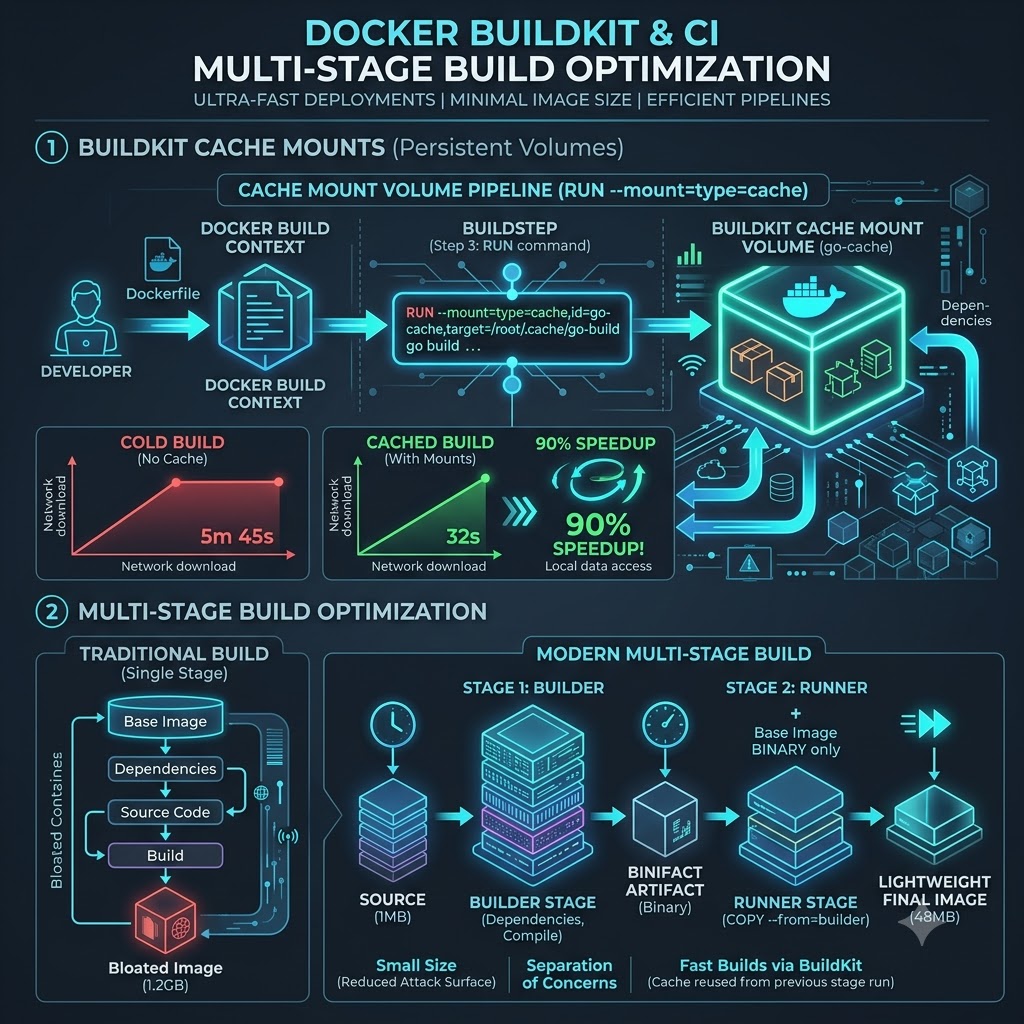
When BuildKit analyzes an instruction graph, it identifies dependencies between individual build steps and executes non-dependent stages simultaneously. For example, if a multi-stage Dockerfile builds a frontend web app in one stage and a backend Go service in another stage, BuildKit compiles both application targets in parallel across available CPU cores. Furthermore, if your build target references only the backend binary image, BuildKit skips the frontend build stage entirely, saving compute cycles and network bandwidth.
To enable BuildKit on Docker Engine versions prior to 23.0, set DOCKER_BUILDKIT=1 in your environment or configure the Docker daemon configuration file:
{
  "features": {
    "buildkit": true
  }
}
Modern Docker Desktop and CLI installations enable BuildKit by default through docker buildx, which provides extended command-line options for managing multi-architecture builds, build instances, and remote caching backends.
Here is a structural comparison showing execution graph differences between legacy Docker builds and BuildKit DAG execution:
+-----------------------------------------------------------------------------------+
| Legacy Docker Builder (Linear Sequential Execution)                              |
| [Step 1: FROM] ---> [Step 2: RUN apt-get] ---> [Step 3: COPY] ---> [Step 4: RUN]  |
+-----------------------------------------------------------------------------------+

+-----------------------------------------------------------------------------------+
| BuildKit Engine (Concurrent DAG Execution Tree)                                   |
|               /---> [Stage 1: Build Go App] ---------\                            |
| [Step 1: LLB]                                         ===> [Stage 3: Final Image] |
|               \---> [Stage 2: Build Web Assets] ------/                           |
+-----------------------------------------------------------------------------------+
Multi-Stage Isolation: Build Environments vs Runtime Images
Multi-stage builds reduce runtime container footprints by separating the heavy compilation environment from the minimal runtime execution image within a single Dockerfile file. Compiling modern applications requires bulky SDKs, compilers, header files, and build tools like GCC, Go toolchains, or Node npm packages that aren't needed once binary compilation finishes. Including these build tools in your final container image inflates image sizes to gigabytes and exposes your production environment to unnecessary security vulnerabilities.

With multi-stage builds, you define multiple FROM instructions within a single Dockerfile. The initial stages act as temporary builder environments equipped with full compilation toolchains. The final stage uses a minimal base image like alpine, distroless, or scratch and copies only the compiled binary artifacts from previous builder stages using COPY --from=<stage-name>.
Let me show you an optimized multi-stage Dockerfile for a Go microservice that shrinks final image size from 800MB down to 15MB:
# Syntax directive required for BuildKit features
# syntax=docker/dockerfile:1.7

# Stage 1: Build Environment
FROM golang:1.22-alpine AS builder

WORKDIR /app

# Install security certificates and git
RUN apk add --no-cache git ca-certificates

# Copy dependency manifests first to maximize layer caching
COPY go.mod go.sum ./
RUN go mod download

# Copy source code and compile statically linked binary
COPY . .
RUN CGO_ENABLED=0 GOOS=linux go build -ldflags="-w -s" -o /app/server ./cmd/api

# Stage 2: Minimal Production Runtime
FROM scratch

# Copy SSL root certificates from builder
COPY --from=builder /etc/ssl/certs/ca-certificates.crt /etc/ssl/certs/

# Copy compiled binary from builder
COPY --from=builder /app/server /server

EXPOSE 8080
ENTRYPOINT ["/server"]
In this production multi-stage setup, the final stage inherits from scratch, which contains zero operating system files, shell utilities, or package managers. The resulting image contains only the statically compiled Go binary and SSL root certificates, providing a minimal attack surface and blazingly fast deployment pull times across your Kubernetes clusters.
Package Manager Cache Mounts: Node, Go, and Python
You use BuildKit cache mounts for package managers by adding --mount=type=cache flags to RUN instructions, persisting directory caches like ~/.cache/go-build, ~/.npm, or /root/.cache/pip across consecutive builds. By default, every RUN step in a Dockerfile executes inside an isolated container filesystem. When package managers download dependencies or compile object files, those cached files are discarded when the RUN step completes, forcing subsequent builds to re-download package archives whenever source code files change.

BuildKit cache mounts solve this problem by mounting persistent host directories directly into the build container during RUN instruction execution. These cache volumes persist across multiple build invocations on the build node, allowing package managers like npm, pip, go, cargo, and apt to reuse cached binaries without storing those temporary cache files inside the final container image layers.
Here's an optimized Dockerfile showing cache mount configurations for Node.js, Go, and Python environments:
# syntax=docker/dockerfile:1.7

# --- Node.js npm Cache Mount
---
FROM node:20-alpine AS node-builder
WORKDIR /app
COPY package*.json ./
# Mount npm cache directory to persist downloaded tarballs
RUN --mount=type=cache,target=/root/.npm     npm ci --prefer-offline

# --- Go Module and Compiler Cache Mount
---
FROM golang:1.22-alpine AS go-builder
WORKDIR /app
COPY go.mod go.sum ./
# Mount both Go module download cache and compiler cache
RUN --mount=type=cache,target=/go/pkg/mod     --mount=type=cache,target=/root/.cache/go-build     go mod download

# --- Python Pip Cache Mount
---
FROM python:3.11-slim AS python-builder
WORKDIR /app
COPY requirements.txt ./
# Mount pip wheel cache
RUN --mount=type=cache,target=/root/.cache/pip \
    pip install -r requirements.txt
Pay close attention to the parameter target=/root/.npm specified in the command line. When BuildKit executes npm ci, it mounts a persistent cache volume at /root/.npm. If you add a new dependency package to package.json, npm fetches only the single new package archive while reusing all previously downloaded dependency tarballs from the cache mount. This optimization reduces dependency installation durations from minutes to seconds.
For Python microservices, standard pip installs can still spend considerable time resolving wheels and compiling C extensions. Pairing BuildKit cache mounts with Astral's Rust-based package manager uv drops dependency sync times to sub-second levels. See our complete guide on using Astral uv in multi-stage Docker builds for lockfile caching and lean production runners.
For multi-tenant build nodes where multiple projects build concurrently, add the id option to scope cache mounts to specific applications (for example --mount=type=cache,id=payment-api-npm,target=/root/.npm). Sharing cache IDs across related services allows microservices with identical dependency sets to share cached build artifacts safely.
Remote Caching Backends in CI/CD Pipelines
You configure remote caching backends in CI/CD pipelines by passing --cache-to and --cache-from flags to docker buildx build, exporting intermediate build layer caches to remote container registries or GitHub Actions cache storage. While local cache mounts speed up builds on a single persistent server, ephemeral CI/CD runners (like GitHub Actions or Kubernetes ephemeral nodes) start with empty local disks, losing local cache state between workflow runs.

Remote caching backends allow build agents to upload layer cache metadata and build artifacts to a central registry or cloud storage bucket upon completing a build. When a new ephemeral CI runner executes a subsequent build job, it queries the remote caching backend with --cache-from, downloading only the changed layer caches required to assemble the new image.
Here are the four primary BuildKit remote cache backend types:
| Cache Backend Type | Target Storage Endpoint | Best Use Case Environment | Configuration Flag Example |
|---|---|---|---|
inline | Embedded in image manifest | Simple single-stage builds | --cache-to type=inline |
registry | Dedicated OCI registry image | Multi-stage enterprise builds | --cache-to type=registry,ref=repo/cache:latest,mode=max |
gha | GitHub Actions Cache Service | GitHub Actions workflows | --cache-to type=gha,mode=max |
local | Shared NFS or local directory | On-premise Jenkins runners | --cache-to type=local,dest=/path/to/cache |
When using the registry or gha cache exporter, setting mode=max is essential for multi-stage builds. By default, mode=min exports cache layers only for the final output image, discarding intermediate builder stage layers. Setting mode=max instructs BuildKit to export layer caches for all stages in the Dockerfile, ensuring that intermediate compilation steps remain fully cached across builds.
Here is a complete, production-grade GitHub Actions workflow utilizing the BuildKit gha cache backend:
name: Build and Push Docker Image

on:
  push:
    branches: [main]

jobs:
  build:
    runs-on: ubuntu-latest
    steps:
      - name: Checkout Code
        uses: actions/checkout@v4

      - name: Set up Docker Buildx
        uses: docker/setup-buildx-action@v3

      - name: Log in to GitHub Container Registry
        uses: docker/login-action@v3
        with:
          registry: ghcr.io
          username: ${{ github.actor }}
          password: ${{ secrets.GITHUB_TOKEN }}

      - name: Build and Push with GHA Remote Cache
        uses: docker/build-push-action@v5
        with:
          context: .
          push: true
          tags: ghcr.io/company-org/api-service:${{ github.sha }}
          cache-from: type=gha
          cache-to: type=gha,mode=max
This GitHub Actions workflow automatically restores BuildKit layer caches from the GitHub cache service before compilation begins. Even if your build executes on a completely fresh ephemeral runner node, BuildKit pulls pre-compiled intermediate layers, enabling near-instantaneous builds.
Secret Mounts and SSH Forwarding Without Leaking Credentials
You use secret mounts and SSH forwarding by specifying --mount=type=secret or --mount=type=ssh in RUN instructions to pass private SSH keys and API tokens to build commands without baking credentials into container image layers. Historically, developers passed build secrets using ARG variables or environment variables, which permanently leaks secret values inside image layer metadata history visible via docker history.

BuildKit secret mounts mount sensitive files into a temporary in-memory filesystem (tmpfs) accessible only during the execution of a single RUN step. Once the command completes, BuildKit unmounts the secret file, ensuring that sensitive token strings or private keys leave zero trace in final or intermediate container image layers.
Here's an example Dockerfile using secret mounts to install private npm packages and clone private Git repositories:
# syntax=docker/dockerfile:1.7

FROM node:20-alpine AS builder
WORKDIR /app

COPY package*.json ./

# Mount private NPM token securely at runtime
RUN --mount=type=secret,id=npm_token     NPM_TOKEN=$(cat /run/secrets/npm_token)     npm ci

COPY . .
RUN npm run build
To build this Dockerfile locally or in CI/CD without leaking secrets, pass the --secret flag during build execution:
# Pass secret from environment variable
export NPM_TOKEN="npm_1a2b3c4d5e6f7g8h9i0j"
docker buildx build --secret id=npm_token,env=NPM_TOKEN -t my-app:latest .

# Pass secret from local file
docker buildx build --secret id=npm_token,src=./.npmrc -t my-app:latest .
If your build process needs to fetch private Go modules or git submodules over SSH, use SSH agent forwarding with --mount=type=ssh. This instructs BuildKit to forward your local SSH agent socket into the build container, allowing git clone commands to authenticate securely using your local SSH identity without mounting raw private key files onto disk.
# syntax=docker/dockerfile:1.7

FROM golang:1.22-alpine AS builder
WORKDIR /app

RUN apk add --no-cache git openssh-client

# Authorize GitHub host key
RUN mkdir -p -m 0700 ~/.ssh && ssh-keyscan github.com >> ~/.ssh/known_hosts

# Clone private dependency using forwarded SSH agent
RUN --mount=type=ssh     git clone git@github.com:company-org/private-lib.git
Executing docker buildx build --ssh default . forwards your active SSH agent session into the container, ensuring safe authentication while maintaining complete credential privacy.
Auditing and Inspecting Layer Caching Efficiency
You audit and inspect BuildKit layer caching efficiency by analyzing build output logs using --progress=plain, inspecting layer history with docker history, and auditing build cache disk usage using docker buildx du. Monitoring cache hit ratios ensures that your Dockerfile instruction ordering isn't accidentally invalidating layer caches on every commit.
When executing builds, pass --progress=plain to view full text execution logs detailing whether BuildKit loaded each step from cache (CACHED) or re-executed the instruction (RUNNING):
docker buildx build --progress=plain -t my-service:latest .
Reviewing the plain progress output reveals exact step execution states:
#5 [builder 2/5] WORKDIR /app
#5 CACHED

#6 [builder 3/5] COPY package*.json ./
#6 CACHED

#7 [builder 4/5] RUN --mount=type=cache,target=/root/.npm npm ci
#7 CACHED

#8 [builder 5/5] COPY . .
#8 DONE 0.4s
If a step shows RUNNING instead of CACHED, inspect preceding instructions. The most common cause of cache invalidation is placing COPY . . too early in a Dockerfile. Because source code files change frequently, placing broad COPY commands near the top of a Dockerfile invalidates all subsequent layer caches. Always copy dependency lockfiles (go.mod, package-lock.json, requirements.txt) first, run dependency downloads, and copy main application source code in later steps.
To manage disk consumption on persistent build servers, use docker buildx du to inspect BuildKit cache disk usage and docker buildx prune to clear stale build caches:
# Inspect active BuildKit cache disk usage
docker buildx du

# Reclaim cache disk space by removing unused build caches older than 7 days
docker buildx prune --filter "until=168h" --force
Regularly pruning stale build caches prevents disk space exhaustion on shared build hosts while retaining frequently used base image layers and package manager cache mounts.
Technical Reference and Troubleshooting
BuildKit Syntax Directives
You enable BuildKit syntax directives by adding # syntax=docker/dockerfile:1.7 as the very first line of your Dockerfile file. This directive instructs BuildKit to download and use the specified Dockerfile frontend parser version, unlocking advanced features like --mount=type=cache, --mount=type=secret, and heredoc syntax even if your host Docker daemon uses an older built-in parser version.
Remote Cache Modes: mode=min vs mode=max
The difference lies in which build stages are included in the exported remote cache archive. Mode min (the default) exports layer caches only for the final target stage of your Dockerfile. Mode max exports layer caches for all intermediate builder stages and build targets. When using multi-stage builds in CI/CD, always set mode=max so intermediate compilation stages remain fully cached across builds.
Package Cache Persistence vs apt-get clean
You shouldn't run apt-get clean or delete package list directories when using BuildKit cache mounts because those commands wipe out the exact package manager cache files you intend to persist across builds. Traditional Docker optimization guides recommended clearing apt lists to keep final layer sizes small. With BuildKit cache mounts (--mount=type=cache,target=/var/cache/apt), cache files exist outside final image layers, making manual cache cleanup commands unnecessary.
Multiple Cache Mounts in a Single RUN Instruction
Yes, you can specify multiple --mount=type=cache flags in a single RUN instruction line. For instance, in a Go project, you can mount both the Go module download cache and the Go build compiler cache simultaneously: RUN --mount=type=cache,target=/go/pkg/mod --mount=type=cache,target=/root/.cache/go-build go build -o server .. This ensures both dependency resolution and binary compilation reuse cached artifacts.
Secret Mounts vs Build ARGs
BuildKit secret mounts (--mount=type=secret) mount sensitive files into a temporary in-memory filesystem (tmpfs) during step execution without saving secret values in layer metadata. Docker ARG variables pass values into environment variables that remain permanently stored in image history metadata, allowing anyone with access to the container image to extract secrets using docker history or docker inspect.
Parallel Multi-Stage Execution Graphs
Docker BuildKit analyzes your Dockerfile to create a Directed Acyclic Graph (DAG) of build stage dependencies. If your Dockerfile contains multiple FROM stages that don't depend on each other, BuildKit compiles those stages concurrently across available CPU cores. If a stage is not required to build the final specified target image, BuildKit skips that stage entirely, optimizing resource usage.
Base Image Selection: Alpine vs Distroless vs Scratch
Choosing between runtime base images depends on your application binary type and debugging requirements. Scratch is an empty base image ideal for statically compiled Go or Rust binaries, producing tiny image sizes with zero OS vulnerabilities. Distroless contains only language runtimes (like Python or Java) and system dependencies without shell binaries, providing high security. Alpine includes a lightweight package manager and busybox shell, making it ideal when container debugging utilities are needed.
You Might Also Like
- Astral uv in Docker: Multi-Stage Builds, BuildKit Caching & Fast CI
- FastAPI Docker Multistage Builds: Cut Your Image Size by 70%
- Why My Docker Images Were 1GB (And How I Shrank Them to 50MB)
- Docker Compose for Local Development: A Complete Setup Guide
Test Your Knowledge
A team is experiencing slow Docker build times in their CI/CD pipeline. They've identified that even minor code changes trigger full re-downloads of hundreds of megabytes of packages and recompilation of dependencies. Which of the following BuildKit features, when correctly implemented, would most directly address this specific problem?
Free In-Browser Developer Tools
Clean AI CLI logs, build cron expressions, decode JWTs, and calculate chmod permissions offline.
Related Articles
Astral uv in Docker: Multi-Stage Builds, BuildKit Caching & Fast CI
Speed up Python Docker builds from minutes to seconds using Astral uv, multi-stage targets, BuildKit persistent cache mounts, and lean runtime images.
Read more
WireGuard Site-to-Site Kernel Mesh: High-Throughput Crypto Routing & MTU Optimization
Setting up high-throughput WireGuard mesh VPNs on Linux kernel: MTU tuning, keepalive dynamics, asymmetric routing, and firewall rules.
Read more
A Practical List of Annoying Click Tasks - and How to Automate Them with Python
Automation isn't about building massive systems - it's about eliminating repetitive tasks and getting back to meaningful work, using small steps, the right tools, and controlled execution.
Read more