Astral uv in Docker: Multi-Stage Builds, BuildKit Caching & Fast CI

Table of Contents(9 sections)
Every developer building Python containers has experienced the slow feedback loop of Docker layer invalidation. You change a single line of application code, run docker build, and watch your terminal spend four minutes re-downloading PyTorch, Pandas, or heavy C extensions from PyPI.
With Astral's Rust-based package manager uv and Docker BuildKit cache mounts, you can drop that re-build time down to under two seconds.
Build comparison at a glance:
| Strategy | Cold Build Time | Code-Only Rebuild | Final Image Size | CVE Attack Surface |
|---|---|---|---|---|
pip install -r reqs.txt | ~65s | ~45s (if invalidated) | ~850MB | High (compilers retained) |
poetry install | ~110s | ~60s | ~920MB | High (poetry runtime retained) |
| uv Multi-Stage + BuildKit | ~4.5s | ~1.2s | ~140MB | Minimal (pure virtualenv) |
The three flaws of traditional Python Dockerfiles
Most production Dockerfiles suffer from three structural performance issues:
- Compilers stay in the final image: Running
apt-get install gcc build-essentialinside a single-stage Dockerfile leaves compilers, header files, and package manager caches inside the production container, bloating image sizes past 1GB. - Layer cache thrashing: Placing
COPY . .before installing dependencies invalidates the dependency cache on every commit. - No persistent wheel caching in CI: Running
docker buildon fresh GitHub Actions runners re-downloads every wheel from PyPI on every pull request.
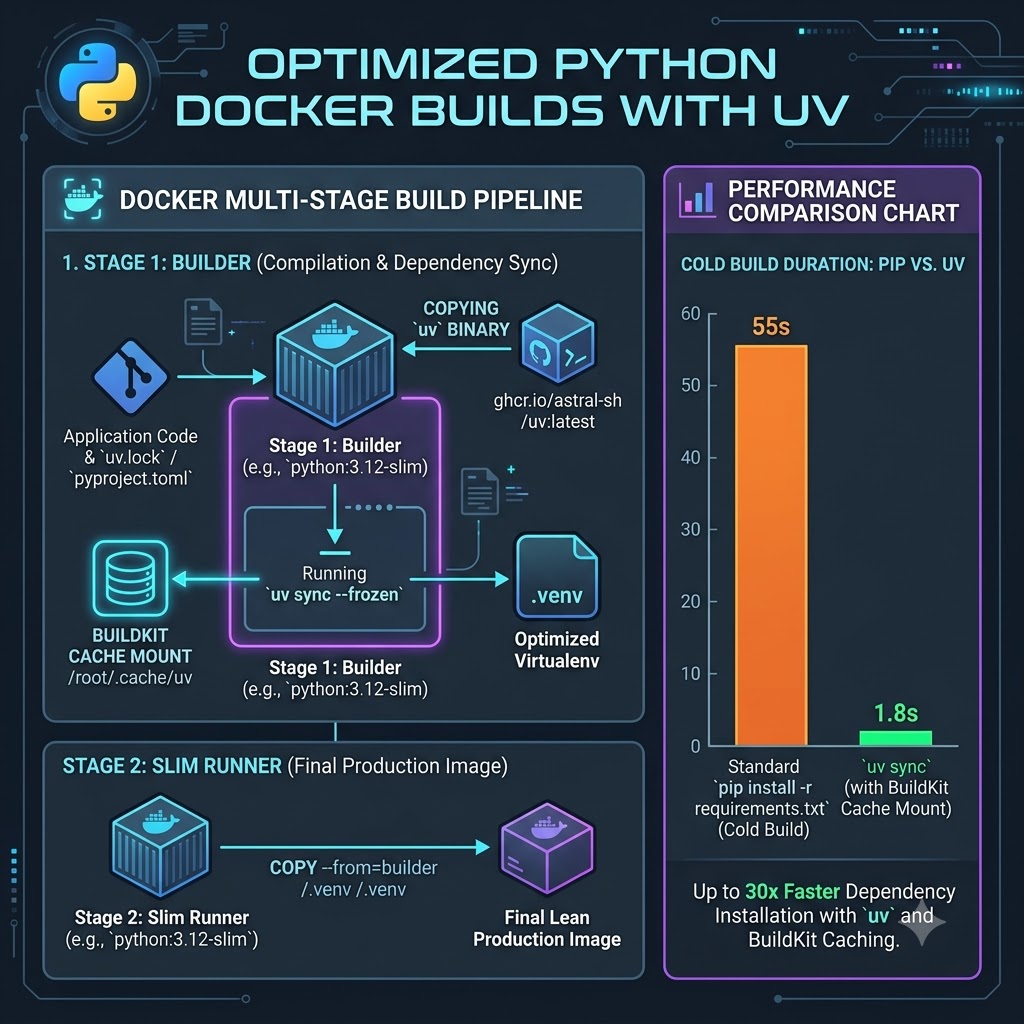
The solution is a clean multi-stage pipeline using the official standalone uv binary and BuildKit persistent cache mounts.
Phase 1: Grabbing the standalone uv binary
Instead of running RUN pip install uv (which requires Python and adds an unnecessary layer), copy the pre-compiled Rust binary directly from Astral's official image:
# syntax=docker/dockerfile:1.7
FROM python:3.12-slim AS builder

# Copy the standalone uv binary directly (sub-millisecond copy)
COPY --from=ghcr.io/astral-sh/uv:latest /uv /uvx /bin/
This ensures uv is available immediately with zero build overhead.
Phase 2: The two-step dependency sync
To prevent source code edits from re-running dependency downloads, split your installation into two distinct stages:
WORKDIR /app

# Enable bytecode compilation and standalone copy linking
ENV UV_COMPILE_BYTECODE=1
ENV UV_LINK_MODE=copy

# Step A: Copy ONLY lockfiles first
COPY pyproject.toml uv.lock ./

# Step B: Install dependencies without installing the root project
RUN --mount=type=cache,target=/root/.cache/uv \
    uv sync --frozen --no-dev --no-install-project
Notice --no-install-project. This tells uv to build the virtual environment and download all third-party dependencies without expecting your application source code to be present yet.
Now, copy your source code and run the final sync:
# Step C: Copy application source code
COPY src/ ./src/

# Step D: Fast sync to install your project into the existing virtualenv
RUN --mount=type=cache,target=/root/.cache/uv \
    uv sync --frozen --no-dev
When you edit src/main.py, Docker re-uses the cached layer from Step B. Step D executes in less than 300 milliseconds because all wheels are already present in .venv.
Phase 3: The lean production runner
The builder stage contains uv, package metadata, and intermediate build tools. None of these belong in production.
In Stage 2, start from a clean python:3.12-slim base, create a non-root user, and copy ONLY the .venv directory:
FROM python:3.12-slim AS runner

# Create non-root system user
RUN groupadd -r appgroup && useradd -r -g appgroup appuser

WORKDIR /app

# Copy the pre-built virtual environment from builder
COPY --from=builder --chown=appuser:appgroup /app/.venv /app/.venv
COPY --from=builder --chown=appuser:appgroup /app/src /app/src

# Put virtualenv binaries at the front of PATH
ENV PATH="/app/.venv/bin:$PATH"

USER appuser

EXPOSE 8000

CMD ["uvicorn", "src.main:app", "--host", "0.0.0.0", "--port", "8000"]
Because PATH points to /app/.venv/bin, running uvicorn executes the binary inside your virtual environment directly without needing python -m or activation scripts.
If you are choosing an ASGI stack to run inside this container, see our benchmark comparison on FastAPI vs Litestar: Performance & Memory. To ensure your async workers remain stable without OOM crashes under production loads, pair this with our guide on profiling async Python memory leaks in production.
Complete copy-paste production Dockerfile
Here is the complete, hardened multi-stage Dockerfile ready for production:
# syntax=docker/dockerfile:1.7
# Stage 1: Build virtual environment
FROM python:3.12-slim AS builder

COPY --from=ghcr.io/astral-sh/uv:latest /uv /uvx /bin/

WORKDIR /app

# Optimize uv execution inside containers
ENV UV_COMPILE_BYTECODE=1 \
    UV_LINK_MODE=copy

# 1. Cache third-party dependencies independently of source code
COPY pyproject.toml uv.lock ./
RUN --mount=type=cache,target=/root/.cache/uv \
    uv sync --frozen --no-dev --no-install-project

# 2. Copy source code and perform final project sync
COPY . .
RUN --mount=type=cache,target=/root/.cache/uv \
    uv sync --frozen --no-dev

# Stage 2: Final minimal production runtime
FROM python:3.12-slim AS runner

RUN groupadd -r appuser && useradd -r -g appuser -d /app -s /sbin/nologin appuser

WORKDIR /app

# Copy only the compiled virtualenv and application source
COPY --from=builder --chown=appuser:appuser /app/.venv /app/.venv
COPY --from=builder --chown=appuser:appuser /app/src /app/src

ENV PATH="/app/.venv/bin:$PATH" \
    PYTHONUNBUFFERED=1 \
    PYTHONDONTWRITEBYTECODE=1

USER appuser

EXPOSE 8000

CMD ["uvicorn", "app.main:app", "--host", "0.0.0.0", "--port", "8000"]
Persisting BuildKit cache mounts in GitHub Actions
On local machines, Docker BuildKit caches /root/.cache/uv across builds automatically. On ephemeral GitHub Actions runners, that cache disappears when the runner terminates.
To persist the uv cache across CI runs, configure Docker's GitHub Actions cache backend (see our deep dive on Docker BuildKit cache mounts and multi-stage optimization for remote cache types and registry exporters):
name: Docker Build & Push

on:
  push:
    branches: [main]

jobs:
  build:
    runs-on: ubuntu-latest
    steps:
      - uses: actions/checkout@v4

      - name: Set up Docker Buildx
        uses: docker/setup-buildx-action@v3

      - name: Build and push
        uses: docker/build-push-action@v5
        with:
          context: .
          push: false
          cache-from: type=gha
          cache-to: type=gha,mode=max
By adding cache-to: type=gha,mode=max, BuildKit exports the persistent /root/.cache/uv mount to GitHub's cache storage. Subsequent PR builds pull cached wheels directly without touching the network.
Rule of thumb
If your Docker build spends more than five seconds resolving dependencies during normal application development, your layer caching boundary is placed too early.
Copy lockfiles alone, sync with --no-install-project, mount /root/.cache/uv, and copy only the .venv directory to your final runner.
You Might Also Like
- FastAPI Docker Multistage Builds: Cut Your Image Size by 70%
- Why My Docker Images Were 1GB (And How I Shrank Them to 50MB)
- Docker Compose for Local Development: A Complete Setup Guide
- Dev Containers Guide: Docker Environments in VS Code
Test Your Knowledge
Free In-Browser Developer Tools
Clean AI CLI logs, build cron expressions, decode JWTs, and calculate chmod permissions offline.
Related Articles

FastAPI Docker Multistage Builds: Cut Your Image Size by 70%
Stop shipping compilers to production. How to use Docker multistage builds with uv and BuildKit caching for FastAPI - from 1.2 GB to under 100 MB, with fast CI rebuilds.
Read more
Docker BuildKit Cache Mounts: Python uv, Go & Node.js Guide (2026)
Accelerate Docker builds using BuildKit cache mounts (--mount=type=cache) and multi-stage targets. Production recipes for Python Astral uv, Go, and Node.js.
Read more
Turborepo Remote Caching at Scale: Pruned Docker Builds, GCS Cache & CI Pipeline Speedup
Comprehensive guide covering turborepo remote caching at scale: pruned docker builds, gcs cache & ci pipeline speedup with production-grade architecture and code examples.
Read more