ソフトウェアエンジニアリングにおけるAIエージェント:実際に機能するアーキテクチャパターン

Table of Contents
AIエージェントに関する誇大広告は、将来的に何ができるかに焦点を当てています。この記事では、現在機能していること、つまり、本番エージェントシステムの背後にあるアーキテクチャパターン、チームが直面している失敗モード、そして実際のコードベースに対して自律型エージェントをデプロイする前に下すべきインフラストラクチャの決定に焦点を当てます。
エージェントとチャットボットの違い
チャットボットはプロンプトに応答します。エージェントはループを実行します。
Observe → Think → Act → Observe (loop until goal met or budget exceeded)
決定的な違いは、フィードバックを伴うツール使用です。エージェントは単にテキストを生成するだけでなく、ツールを呼び出し、結果を受け取り、その結果に基づいて次に何をすべきかを決定します。これにより、単一のLLM呼び出しにはないフィードバックループが作成されます。
具体的には、エージェントは次のことを行う可能性があります。
- 失敗したテスト出力を読み取る
- 関連する関数をコードベースで検索する
- 関数の実装を読み取る
- ファイルを変更する
- テストを再度実行する
- 新しい出力を読み取る
- テストが合格するまで繰り返す
各ステップでツールを使用します。LLMは、ステップ全体で蓄積されたコンテキストに基づいて、どのツールを呼び出すかを決定します。これは、2022年に導入されたReAct(Reasoning + Acting)パターンであり、今日のほとんどの本番エージェントシステムの基盤となっています。
ツール呼び出しループ
実装レベルでは、最小限のエージェントループは次のようになります。
import anthropic
import json
from typing import Any

client = anthropic.Anthropic()

# Define the tools the agent can use
TOOLS = [
    {
        "name": "read_file",
        "description": "Read the contents of a file",
        "input_schema": {
            "type": "object",
            "properties": {
                "path": {"type": "string", "description": "File path to read"}
            },
            "required": ["path"]
        }
    },
    {
        "name": "run_command",
        "description": "Run a shell command and return stdout/stderr",
        "input_schema": {
            "type": "object",
            "properties": {
                "command": {"type": "string", "description": "Shell command to run"}
            },
            "required": ["command"]
        }
    },
    {
        "name": "write_file",
        "description": "Write content to a file",
        "input_schema": {
            "type": "object",
            "properties": {
                "path": {"type": "string", "description": "File path"},
                "content": {"type": "string", "description": "Content to write"}
            },
            "required": ["path", "content"]
        }
    }
]

def execute_tool(tool_name: str, tool_input: dict) -> str:
    """Execute a tool and return its output as a string."""
    import subprocess
    from pathlib import Path

    if tool_name == "read_file":
        path = Path(tool_input["path"])
        if not path.exists():
            return f"Error: file {path} does not exist"
        return path.read_text()

    elif tool_name == "run_command":
        result = subprocess.run(
            tool_input["command"],
            shell=True,
            capture_output=True,
            text=True,
            timeout=30
        )
        output = result.stdout
        if result.stderr:
            output += f"\nSTDERR:\n{result.stderr}"
        return output or "(no output)"

    elif tool_name == "write_file":
        path = Path(tool_input["path"])
        path.parent.mkdir(parents=True, exist_ok=True)
        path.write_text(tool_input["content"])
        return f"Written {len(tool_input['content'])} bytes to {path}"

    return f"Unknown tool: {tool_name}"

def run_agent(task: str, max_iterations: int = 20) -> str:
    """Run an agent loop until task completion or iteration limit."""
    messages = [{"role": "user", "content": task}]

    for iteration in range(max_iterations):
        response = client.messages.create(
            model="claude-opus-4-5",
            max_tokens=4096,
            tools=TOOLS,
            messages=messages,
        )

        # Add assistant response to history
        messages.append({"role": "assistant", "content": response.content})

        # Check if agent is done
        if response.stop_reason == "end_turn":
            # Extract text response
            for block in response.content:
                if hasattr(block, "text"):
                    return block.text
            return "Task completed"

        # Process tool calls
        if response.stop_reason == "tool_use":
            tool_results = []

            for block in response.content:
                if block.type == "tool_use":
                    print(f"  → Calling {block.name}({json.dumps(block.input)[:100]})")
                    result = execute_tool(block.name, block.input)
                    tool_results.append({
                        "type": "tool_result",
                        "tool_use_id": block.id,
                        "content": result
                    })

            messages.append({"role": "user", "content": tool_results})

    return f"Reached iteration limit ({max_iterations})"
これが核となります。メモリ、マルチエージェント連携、安全ガードレールなど、他のすべてはこのループの上に構築されます。
モデルコンテキストプロトコル(MCP):ツール統合の標準化
上記のツール呼び出しループは、JSONスキーマでツールをインラインで定義しています。複数のツールに対して複数のエージェントを構築するチームにとって、これはすぐに混乱を招きます。すべてのエージェントが、わずかに異なるスキーマで同じツールを再定義します。
2024年後半にAnthropicによって導入された**モデルコンテキストプロトコル(MCP)**は、エージェントが外部システムに接続する方法を標準化します。すべてのエージェントプロンプトにツール定義を埋め込む代わりに、ツールは任意の互換性のあるエージェントがクエリできるMCPサーバーに存在します。
Agent ←→ MCP Client ←→ MCP Server (filesystem, GitHub, databases, etc.)
MCPサーバーは以下を公開します。
- ツール: エージェントが呼び出すことができる関数(例:
create_file,list_issues) - リソース: エージェントが読み取ることができるデータ(例: ファイルの内容、データベースレコード)
- プロンプト: パラメータ化されたプロンプトテンプレート
# Example: connecting an agent to an MCP server
import asyncio
from mcp import ClientSession, StdioServerParameters
from mcp.client.stdio import stdio_client

async def run_agent_with_mcp(task: str) -> str:
    # Connect to a filesystem MCP server
    server_params = StdioServerParameters(
        command="uvx",
        args=["mcp-server-filesystem", "/workspace"]
    )

    async with stdio_client(server_params) as (read, write):
        async with ClientSession(read, write) as session:
            await session.initialize()

            # List available tools from the MCP server
            tools_result = await session.list_tools()
            tools = [t.model_dump() for t in tools_result.tools]

            # Run agent with MCP tools
            # (same loop as above, but tools come from MCP server)
            print(f"Available tools: {[t['name'] for t in tools]}")
            return "task_result"
MCPは現在、Claude、OpenAI、Gemini、およびほとんどの主要なエージェントフレームワークでサポートされています。ツールレイヤーをMCPサーバーとして構築することは、モデルプロバイダー間で機能することを意味します。
メモリ:最も難しい部分
エージェントには4種類のメモリがあり、それぞれ異なるトレードオフがあります。
| タイプ | ストレージ | 取得 | ユースケース |
|---|---|---|---|
| インコンテキスト | LLMコンテキストウィンドウ | 自動(コンテキスト内のすべて) | 短いタスク、ウィンドウに収まる |
| 外部(ベクトル) | ベクトルデータベース | 意味的類似性検索 | 長い会話、ナレッジベース |
| 外部(構造化) | SQL/KVストア | 完全一致検索 | ユーザー設定、タスク状態 |
| インウェイト | モデルウェイト | 自動(組み込み) | トレーニングデータ、実行時に変更不可 |
インコンテキストメモリ
最もシンプルなアプローチは、会話全体をコンテキストウィンドウに保持することです。現在のモデルでは128K〜200Kトークンのコンテキスト制限を超えない限り機能します。
圧縮戦略: 制限に近づいたら、古いターンを要約します。
def compress_history(messages: list, keep_last_n: int = 10) -> list:
    """Compress old messages when approaching context limit."""
    if len(messages) <= keep_last_n:
        return messages

    # Summarize old messages
    old_messages = messages[:-keep_last_n]
    summary_prompt = f"""Summarize these agent actions and their results concisely:

{json.dumps(old_messages, indent=2)}

Summary (keep all file paths, error messages, and key decisions):"""

    summary_response = client.messages.create(
        model="claude-haiku-4-5",  # cheaper model for summarization
        max_tokens=1000,
        messages=[{"role": "user", "content": summary_prompt}]
    )

    summary = summary_response.content[0].text
    return [{"role": "user", "content": f"[Earlier context summary]: {summary}"}] + messages[-keep_last_n:]
ベクトルメモリ
多くのセッションにまたがるタスクや、以前の知識を呼び出す必要があるタスクの場合、エージェントの観測結果をベクトルデータベースに保存します。
from qdrant_client import QdrantClient
from qdrant_client.models import Distance, VectorParams, PointStruct
import anthropic

embed_client = anthropic.Anthropic()

def store_observation(collection: str, text: str, metadata: dict) -> None:
    """Store an agent observation in vector memory."""
    # Get embedding
    response = embed_client.embeddings.create(
        model="voyage-3",
        input=[text]
    )
    vector = response.embeddings[0]

    qdrant = QdrantClient("localhost", port=6333)
    qdrant.upsert(
        collection_name=collection,
        points=[PointStruct(
            id=hash(text) % (2**32),
            vector=vector,
            payload={"text": text, **metadata}
        )]
    )

def recall_relevant(collection: str, query: str, top_k: int = 5) -> list[str]:
    """Retrieve relevant past observations for a query."""
    response = embed_client.embeddings.create(
        model="voyage-3",
        input=[query]
    )
    query_vector = response.embeddings[0]

    qdrant = QdrantClient("localhost", port=6333)
    results = qdrant.search(
        collection_name=collection,
        query_vector=query_vector,
        limit=top_k
    )

    return [r.payload["text"] for r in results]
マルチエージェント連携
単一のエージェントは、コンテキストサイズ、タスクの複雑さ、専門化の必要性といった限界に達します。マルチエージェントアーキテクチャは、共有状態を介して連携する専門化されたエージェントに作業を分割します。
一般的なパターン:
オーケストレーター → ワーカー: 1つのエージェントがタスクを分解し、専門化されたワーカーにサブタスクをディスパッチし、結果を集約します。
def orchestrator_loop(high_level_task: str) -> str:
    """Orchestrator that delegates to specialized sub-agents."""
    subtasks = decompose_task(high_level_task)  # LLM call

    results = {}
    for subtask in subtasks:
        agent_type = route_to_agent(subtask)  # LLM call

        if agent_type == "code_writer":
            results[subtask] = run_code_agent(subtask)
        elif agent_type == "test_runner":
            results[subtask] = run_test_agent(subtask)
        elif agent_type == "reviewer":
            results[subtask] = run_review_agent(subtask)

    return aggregate_results(results)  # LLM call
批評家パターン: 1つのエージェントが出力を生成し、別のエージェントがそれを批評します。
def generate_with_critique(task: str, max_rounds: int = 3) -> str:
    """Generate output, critique it, revise until acceptable."""
    content = run_agent(task)  # generator agent

    for _ in range(max_rounds):
        critique = run_agent(
            f"Review this output critically:\n\n{content}\n\n"
            f"Original task: {task}\n\n"
            "List specific issues. If acceptable, say 'APPROVED'."
        )

        if "APPROVED" in critique:
            return content

        content = run_agent(
            f"Revise based on this critique:\n\n{critique}\n\n"
            f"Current content:\n\n{content}"
        )

    return content
安全境界:デプロイする前に定義すべきこと
これは、ほとんどのチュートリアルが省略している部分です。ファイルを変更したり、コマンドを実行したり、外部APIを呼び出したりできるエージェントは、深刻な損害を引き起こす可能性があります。エージェントコードを記述する前に、これらの制約を定義してください。
1. ファイルシステム境界
from pathlib import Path

ALLOWED_WRITE_PATHS = [Path("/workspace"), Path("/tmp/agent")]
FORBIDDEN_PATHS = [Path("/etc"), Path("/root"), Path.home() / ".ssh"]

def safe_write_file(path_str: str, content: str) -> str:
    path = Path(path_str).resolve()

    for forbidden in FORBIDDEN_PATHS:
        if path.is_relative_to(forbidden):
            return f"BLOCKED: cannot write to {forbidden}"

    if not any(path.is_relative_to(allowed) for allowed in ALLOWED_WRITE_PATHS):
        return f"BLOCKED: {path} is outside allowed write paths"

    path.parent.mkdir(parents=True, exist_ok=True)
    path.write_text(content)
    return f"Written to {path}"
2. コマンド許可リスト
import shlex

ALLOWED_COMMANDS = {"pytest", "ruff", "mypy", "npm", "git diff", "git status"}
FORBIDDEN_COMMAND_PREFIXES = ("rm -rf", "git push", "git reset --hard", "sudo", "curl", "wget")

def safe_run_command(command: str) -> str:
    # Check forbidden prefixes
    stripped = command.strip()
    for forbidden in FORBIDDEN_COMMAND_PREFIXES:
        if stripped.startswith(forbidden):
            return f"BLOCKED: command matches forbidden pattern '{forbidden}'"

    # Check against allowlist (optional — more restrictive)
    cmd_parts = shlex.split(stripped)
    base_cmd = cmd_parts[0] if cmd_parts else ""
    if base_cmd not in ALLOWED_COMMANDS:
        return f"BLOCKED: '{base_cmd}' not in allowed commands. Allowed: {ALLOWED_COMMANDS}"

    # Actually run
    import subprocess
    result = subprocess.run(command, shell=True, capture_output=True, text=True, timeout=60)
    return result.stdout + (f"\nSTDERR:\n{result.stderr}" if result.stderr else "")
3. トークンとイテレーションの予算
タスクごとの最大費用を常に定義してください。監査のためにすべてのツール呼び出しをログに記録してください。異常なパターン(ループ内で同じコマンド → 潜在的な問題)を警告してください。
実際の失敗モード
実際に何が壊れるか:
- ツール呼び出しの幻覚: エージェントがスキーマに存在しないパラメータでツールを呼び出す。修正: 実行前に入力の検証、構造化されたエラーの返却。
- コンテキスト汚染: 古いエラーメッセージが関連するコンテキストを埋め尽くす。修正: 履歴の圧縮、構造化されたツール結果の使用。
- 無限ループ: エージェントが同じ失敗するアプローチを繰り返し試みる。修正: 試行されたアクションを追跡し、同じ呼び出しの繰り返しで中断する。
- 過信: エージェントが検証せずに成功を報告する。修正: 常に検証する — テストを実行し、ファイルの内容を確認し、エージェントの自己報告を信用しない。
- スコープクリープ: エージェントが元のタスクを超えて「役立つ」変更を行う。修正: システムプロンプトで明示的なタスク境界を設定し、コミット前に差分をレビューする。
こちらもどうぞ
Free In-Browser Developer Tools
Clean AI CLI logs, build cron expressions, decode JWTs, and calculate chmod permissions offline.
Related Articles

PythonとClaudeでゼロから始めるMCPサーバー構築:完全ガイド
Python、FastMCP、型付きツール、リソース、Claude Desktop連携を用いて、本番環境向けModel Context Protocol (MCP)サーバーを構築するステップバイステップガイドです。
Read more
本番RAG向けVectorDatabase (2026): Pinecone vs Qdrant vs Milvus vs pgvector
本番RAGパイプライン向けにPinecone、Qdrant、Milvus、pgvectorのアーキテクチャを、HNSW vs IVFFlatインデックス、単段フィルタリング検索、p95レイテンシ、メモリフットプリントでベンチマークします。
Read more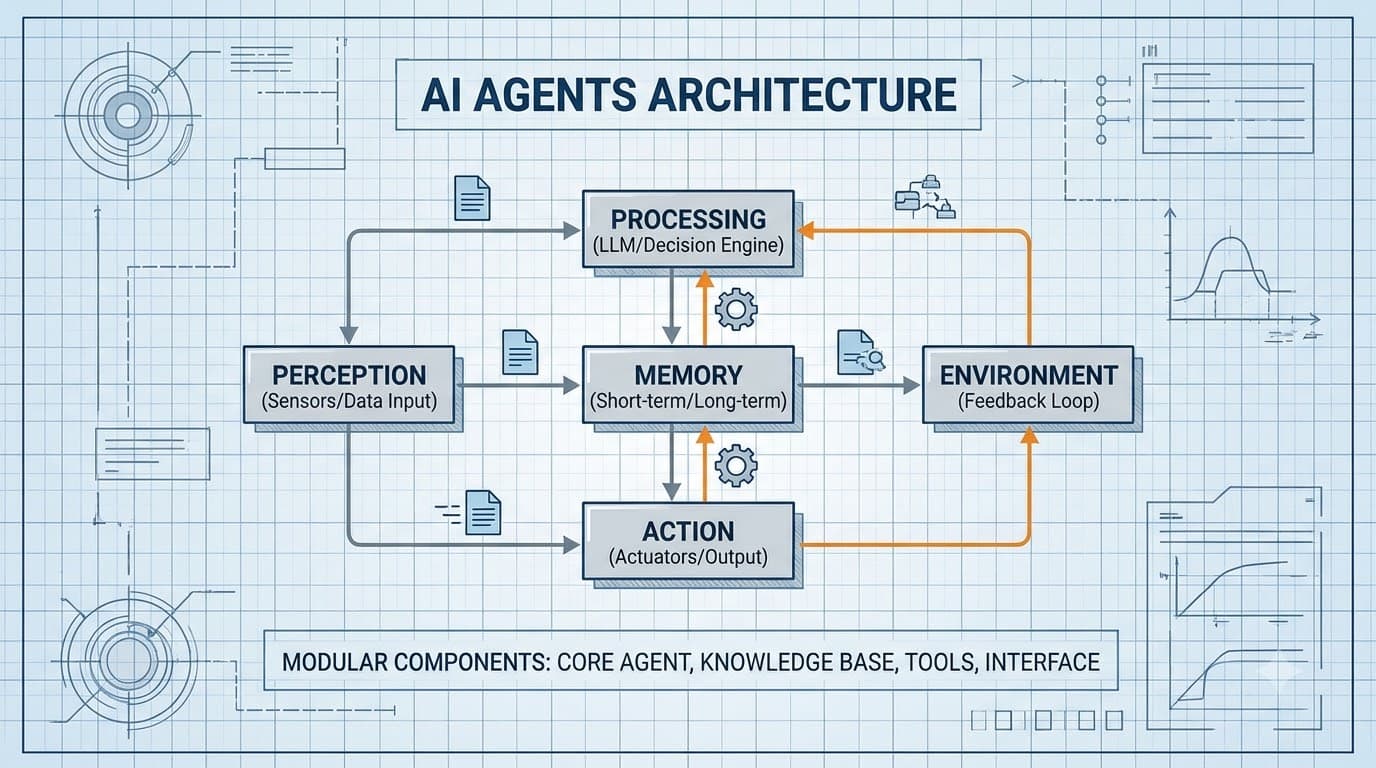
AIエージェントアーキテクチャの実践:メモリ、ツール利用、および失敗モード
ReActループ、ベクトルメモリ、ツール呼び出しパターン、マルチエージェント連携、および適切に失敗するエージェントのテスト方法など、2026年にAIエージェントシステムを構築するための実用的なガイド。
Read more