Understanding React Hydration Mismatch and Server Components


Table of Contents
React's Server Components and hydration architecture represent one of the most significant shifts in frontend web development over the last decade. By decoupling server rendering from client interactivity, modern frameworks like Next.js deliver static HTML instantaneously while streaming and hydrating client logic on demand.
However, this hybrid architecture introduces a subtle and frustrating class of runtime bugs: hydration mismatches. When the DOM tree generated on the server diverges by even a single text node or attribute from what the client produces during its initial reconciliation pass, React halts hydration, warns violently in development, and falls back to costly client re-renders.
What is a Hydration Mismatch?
A hydration mismatch occurs when the server-rendered HTML string differs from the Virtual DOM tree produced during React's first render pass in the browser. React expects the DOM on screen to be an exact representation of client component state at mount time.
Next.js Hydration Error Matcher & Fixer
Diagnose Error #418, #423, #425 & get copy-paste code diffs
Paste Next.js or React hydration error logs to instantly diagnose server-client HTML mismatches (dates, localStorage, extension injection) and generate safe fixes.
In this deep dive, we will unpack how React reconciles server markup, analyze the five most common root causes with reproducible code examples, and implement four battle-tested patterns to guarantee error-free hydration across React 18, React 19, and Next.js App Router.
The Anatomy of Hydration: How React Takes Over Static HTML
To understand why mismatches happen, you must visualize what the browser and React runtime execute during page load.
Phase 1: Server Rendering (SSR & RSC)
On the server, Next.js executes your React component tree. Server Components render into a compact intermediate stream known as the RSC Payload (a JSON-like serialized description of JSX elements and props). Client Components ('use client') emit both HTML elements and metadata referencing client JS bundles. The server assembles this into a complete, valid HTML document and streams it to the user.
Phase 2: First Contentful Paint (FCP)
The browser downloads the HTML payload and parses it immediately. The user sees a fully rendered visual page within milliseconds. At this moment, buttons and forms are purely decorative—no JavaScript event listeners are attached yet.
Phase 3: Hydration Reconciliation
The browser downloads the JavaScript bundles. React mounts the application, constructing an in-memory Virtual DOM tree from the root. Instead of creating new DOM nodes with document.createElement(), React traverses the existing DOM tree and compares each node against the newly computed Virtual DOM:
- Tag match check: Does
<div id="profile">match<div id="profile">? - Attribute match check: Do
className,href, andstylematch? - Text content check: Does
"Welcome back, Guest"match"Welcome back, John"? - Listener attachment: React binds
onClick,onChange, and synthetic event delegations to the matching DOM elements.
Server Response (HTML):
  <div>
    <span>Welcome</span>
    <time>08:00 AM UTC</time>  <-- Generated on Server
  </div>

Client Initial Render (VDOM):
  <div>
    <span>Welcome</span>
    <time>01:00 AM PST</time>  <-- Computed in Browser (User Local Timezone)
  </div>

RESULT: Hydration Mismatch Error!
React Warning: Text content did not match. Server: "08:00 AM UTC" Client: "01:00 AM PST"
If the trees match identically, hydration completes silently in a single tick. If a mismatch is detected, React logs a descriptive error in development (Hydration failed because the initial UI does not match what was rendered on the server). In React 18+, React attempts a client recovery pass, replacing the mismatched server DOM node with the client-rendered output, causing layout shifts (CLS) and wasted CPU cycles.
Five Root Causes of Hydration Mismatches (With Code)
Hydration errors fall into five distinct categories. Let us examine each with code and solutions.
1. Browser-Only Globals During Render
Accessing window, document, localStorage, or navigator inside the render body is the single most frequent cause of hydration errors.
// ❌ ANTI-PATTERN: Direct browser API access in render
export function UserGreeting() {
  // On the server, typeof window is "undefined" -> returns "Guest"
  // On the client, localStorage has a token -> returns "Alex"
  const username = typeof window !== 'undefined'
    ? localStorage.getItem('user_name') || 'Guest'
    : 'Guest';

  return <h1>Welcome back, {username}!</h1>;
}
During server render, username evaluates to "Guest". The browser renders <h1>Welcome back, Guest!</h1>. Once client JavaScript runs, typeof window !== 'undefined' evaluates to true, pulling "Alex" from localStorage. React's Virtual DOM expects <h1>Welcome back, Alex!</h1>, colliding with the server's HTML.
2. Timezone and Locale-Dependent Formatting
Rendering dates, times, or currencies without pinned timezone parameters causes mismatches whenever the server host and visitor reside in different geographic regions.
// ❌ ANTI-PATTERN: Unpinned date and time formatting
export function OrderTimestamp({ timestamp }: { timestamp: number }) {
  // Server in Virginia (US East): "9/22/2026, 4:00:00 AM"
  // User in Tokyo (JST):         "2026/9/22 17:00:00"
  const formatted = new Date(timestamp).toLocaleString();

  return <span className="text-gray-500">{formatted}</span>;
}
To eliminate locale divergence, format with explicit locale strings and UTC timezones:
// ✅ SOLUTION: Explicit locale and timeZone enforcement
export function OrderTimestamp({ timestamp }: { timestamp: number }) {
  const formatted = new Intl.DateTimeFormat('en-US', {
    dateStyle: 'medium',
    timeStyle: 'short',
    timeZone: 'UTC',
  }).format(new Date(timestamp));

  return <span className="text-gray-500">{formatted} UTC</span>;
}
3. Non-Deterministic Values (Math.random, Date.now, UUIDs)
Generating random identifiers or timestamps inside the render phase guarantees that server and client values diverge.
// ❌ ANTI-PATTERN: Generating random IDs in component scope
export function InputField({ label }: { label: string }) {
  const id = `input-${Math.random().toString(36).slice(2, 9)}`;

  return (
    <div>
      <label htmlFor={id}>{label}</label>
      <input id={id} type="text" />
    </div>
  );
}
React 18 provides useId() specifically to solve this problem. useId() generates a stable, deterministic identifier that is identical across both SSR and client hydration:
// ✅ SOLUTION: Deterministic ID generation with useId()
import { useId } from 'react';

export function InputField({ label }: { label: string }) {
  const id = useId();

  return (
    <div>
      <label htmlFor={id}>{label}</label>
      <input id={id} type="text" />
    </div>
  );
}
4. Invalid HTML Spec Nesting
Web browsers feature an ancient, forgiving HTML parsing specification. If a web developer writes invalid HTML nesting, the browser's native parser automatically rewrites and rearranges the DOM tree before React's JavaScript bundle even loads.
Common illegal HTML nesting rules:
- Placing a
<div>inside a<p>tag: The browser automatically closes the<p>immediately before the<div>, producing sibling<p></p><div>...</div><p></p>nodes. - Placing an
<a>tag inside another<a>tag. - Omitting
<tbody>inside a<table>: The browser inserts a synthetic<tbody>element into the DOM. - Placing
<ul>or<li>outside list containers.
// ❌ ANTI-PATTERN: Invalid HTML nesting
export function ArticleSnippet() {
  return (
    <p>
      React is a declarative UI library.
      {/* <div> inside <p> is forbidden by HTML spec */}
      <div className="callout">Note: Version 19 is out!</div>
    </p>
  );
}
When React attempts to hydrate, it expects <p> to contain <div>. But the browser DOM has <p>React is...</p><div class="callout">...</div>. React cannot reconcile the tree and throws an immediate hydration mismatch.
5. Third-Party Browser Extensions and Injected Scripts
Extensions like Grammarly, Google Translate, LastPass, or Dark Reader inject attributes (data-new-gr-c-s-check-loaded, spellcheck="false") or insert wrapping elements directly into <body> or input fields before React runs.
While you cannot stop users from installing extensions, you can prevent extension-induced mismatches by applying suppressHydrationWarning on root layout tags:
// In app/layout.tsx
export default function RootLayout({ children }: { children: React.ReactNode }) {
  return (
    <html lang="en" suppressHydrationWarning>
      <body suppressHydrationWarning className="min-h-screen bg-background">
        {children}
      </body>
    </html>
  );
}
suppressHydrationWarning instructs React not to warn about mismatched attributes on that specific DOM node. It only applies one level deep and does not suppress mismatches on child elements.
Four Production Architectural Patterns to Eliminate Mismatches
Depending on your use case, choose the pattern that guarantees clean hydration without sacrificing user experience.
Pattern 1: The Two-Pass Mounting Pattern (hasMounted)
When a component inherently depends on client-only state (such as checking window width or rendering user preferences from localStorage), delay rendering the client-specific markup until after the initial hydration pass completes.
// components/ClientOnly.tsx
'use client';

import { useState, useEffect } from 'react';

interface ClientOnlyProps {
  children: React.ReactNode;
  fallback?: React.ReactNode;
}

export function ClientOnly({ children, fallback = null }: ClientOnlyProps) {
  const [hasMounted, setHasMounted] = useState(false);

  useEffect(() => {
    setHasMounted(true);
  }, []);

  if (!hasMounted) {
    return <>{fallback}</>;
  }

  return <>{children}</>;
}
Usage in a component:
export function NavigationProfile() {
  return (
    <ClientOnly fallback={<div className="h-8 w-24 bg-gray-200 animate-pulse rounded" />}>
      <UserAccountDropdown />
    </ClientOnly>
  );
}
How it works: During SSR, hasMounted is false, so the server emits the fallback skeleton. During initial client hydration, hasMounted is still false, matching the server HTML perfectly. In the subsequent useEffect microtask, setHasMounted(true) triggers a re-render, mounting the interactive component with zero mismatch warnings.
Pattern 2: Idiomatic State Syncing via useSyncExternalStore
While two-pass rendering works, it introduces an extra render cycle and potential layout shift. For browser state like online status, media queries, or local storage, React 18's useSyncExternalStore is the professional standard:
// hooks/useOnlineStatus.ts
'use client';

import { useSyncExternalStore } from 'react';

function subscribe(callback: () => void) {
  window.addEventListener('online', callback);
  window.addEventListener('offline', callback);
  return () => {
    window.removeEventListener('online', callback);
    window.removeEventListener('offline', callback);
  };
}

export function useOnlineStatus() {
  return useSyncExternalStore(
    subscribe,
    () => navigator.onLine, // Client snapshot
    () => true              // Server snapshot (deterministic fallback)
  );
}
export function StatusBadge() {
  const isOnline = useOnlineStatus();

  return (
    <span className={isOnline ? 'text-emerald-500' : 'text-rose-500'}>
      {isOnline ? 'System Online' : 'Offline Mode'}
    </span>
  );
}
useSyncExternalStore explicitly separates the server snapshot from client subscription, avoiding race conditions and hydration divergence cleanly.
Pattern 3: Dynamic Client Imports with { ssr: false }
If an entire heavy component depends on canvas, WebGL, Leaflet maps, or browser audio APIs, rendering it on the server is wasteful. Use Next.js dynamic imports with ssr: false:
// components/AnalyticsChartWrapper.tsx
import dynamic from 'next/dynamic';

const HeavyChart = dynamic(
  () => import('@/components/HeavyChart').then((mod) => mod.HeavyChart),
  {
    ssr: false,
    loading: () => <div className="h-64 w-full bg-muted animate-pulse rounded-lg" />,
  }
);

export function Dashboard() {
  return (
    <div className="space-y-6">
      <h2>Performance Metrics</h2>
      <HeavyChart />
    </div>
  );
}
With ssr: false, Next.js completely skips rendering HeavyChart on the server, injecting the loading component into the HTML and loading the real chart strictly on the client.
Pattern 4: Target-Specific suppressHydrationWarning
When dynamic content like relative timestamps ("3 minutes ago") or localized prices cannot be pre-computed at build time, apply suppressHydrationWarning directly to the leaf text node:
export function RelativeTime({ date }: { date: string }) {
  // Format relative timestamp
  const relative = formatTimeAgo(new Date(date));

  return (
    <time dateTime={date} suppressHydrationWarning>
      {relative}
    </time>
  );
}
Scope of suppressHydrationWarning
Always apply suppressHydrationWarning to the lowest possible element in the DOM tree (e.g. <time>, <span>). Placing it on a parent <div> suppresses hydration warnings for all child elements, blinding you to actual markup bugs.
Server Components vs Client Components: The Serialization Boundary
The introduction of React Server Components (RSC) eliminates an entire category of hydration issues because Server Components do not hydrate.
Component Architecture:
┌──────────────────────────────────────────────┐
│  Server Component (BlogPage)                 │
│  - Fetches from PostgreSQL database directly │
│  - Zero client JS emitted                    │
│  - NEVER HYDRATES (Zero mismatch risk!)      │
│                                              │
│  ┌────────────────────────────────────────┐  │
│  │ Client Component ('use client')        │  │
│  │ - Interactive Like Button              │  │
│  │ - Hydrates event listeners             │  │
│  │ - Must maintain HTML consistency       │  │
│  └────────────────────────────────────────┘  │
└──────────────────────────────────────────────┘
Because Server Components execute strictly in the Node.js/Edge runtime and stream serialized HTML/RSC payloads, they cannot trigger hydration errors. Hydration occurs exclusively at the boundaries of components marked with 'use client'.
The Golden Rule of Interleaving
You can render Server Components inside Client Components by passing them via children:
// app/components/Modal.tsx ('use client')
'use client';

import { useState } from 'react';

export function Modal({ children }: { children: React.ReactNode }) {
  const [isOpen, setIsOpen] = useState(false);

  return (
    <div>
      <button onClick={() => setIsOpen(true)}>Open Modal</button>
      {isOpen && <div className="modal-overlay">{children}</div>}
    </div>
  );
}
// app/page.tsx (Server Component)
import { Modal } from './components/Modal';
import { DatabaseUserList } from './components/DatabaseUserList'; // Server Component!

export default async function Page() {
  return (
    <main>
      <h1>Admin Portal</h1>
      <Modal>
        {/* DatabaseUserList runs on the server and passes static JSX to Modal */}
        <DatabaseUserList />
      </Modal>
    </main>
  );
}
Here, DatabaseUserList runs purely on the server. Its rendered output is passed to Modal as serializable JSX children, preserving RSC zero-bundle benefits while maintaining client interactivity in the modal shell.
Hydration Debugging Checklist
When you encounter a hydration warning in development, work through this systematic checklist:
| Check | Inspection Step | Remediation |
|---|---|---|
| 1. HTML Hierarchy | Check console for validateDOMNesting(...) errors | Replace illegal tags (e.g. <div> inside <p>, <a> inside <a>). |
| 2. Browser APIs | Search component for window, document, localStorage, matchMedia | Move inside useEffect or wrap with ClientOnly helper. |
| 3. Date & Time | Look for toLocaleString(), Date.now(), or relative formatters | Pin locale and timeZone: 'UTC' or add suppressHydrationWarning. |
| 4. ID Generation | Check for Math.random() or manual counter strings | Replace with React's built-in useId() hook. |
| 5. Third-Party Extensions | Check if error disappears in Chrome Incognito mode (extensions disabled) | Add suppressHydrationWarning to <html> and <body>. |
| 6. Conditional SSR | Verify if props passed to 'use client' differ on initial server render | Ensure data fetching returns identical initial payload for server & client. |
Interactive Knowledge Check
Summary
Hydration mismatches are not random bugs—they are deterministic signals that your server and client execution environments disagree on the state of the interface.
By enforcing valid HTML semantics, leveraging useId(), managing client-only dependencies with useSyncExternalStore or two-pass mounting, and keeping business logic inside Server Components, you eliminate hydration friction entirely, providing users with instant, seamless web applications.
You Might Also Like
Free In-Browser Developer Tools
Clean AI CLI logs, build cron expressions, decode JWTs, and calculate chmod permissions offline.
Related Articles

Next.js App Router with Prisma: Setup & Connection Pooling
Complete Next.js + Prisma guide for App Router. Prevent global connection pool exhaustion, type-safe queries, server action mutations, and seed scripts.
Read more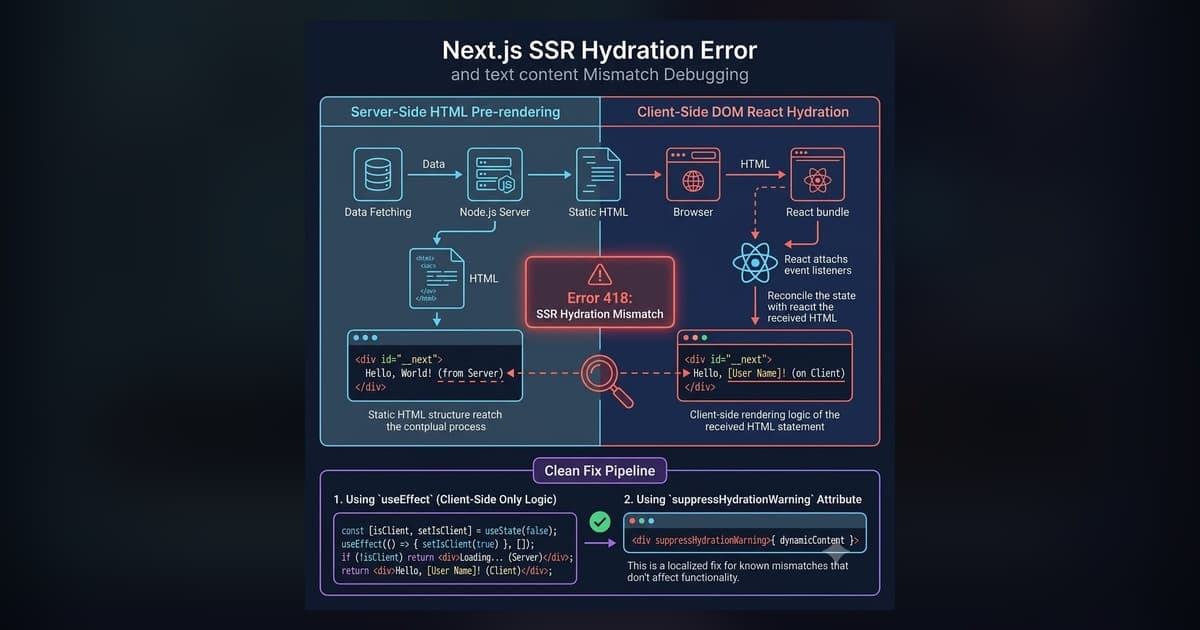
Fix Next.js Hydration Errors: React 418, Text Mismatch & suppressHydrationWarning (2026)
Copy-paste fixes for every Next.js hydration error: React #418 (browser extensions), text content mismatch, dark mode flash, suppressHydrationWarning, and Suspense #423/#425 — with real code examples.
Read more
How I Built My Portfolio with Next.js, Contentlayer, and Git Submodules
Architecture breakdown of locionic.com: Next.js App Router, Contentlayer type-safe MDX, RSC payload optimization, and automated internal link meshes.
Read more