Next.js Hydration Error: Fix React 418, 423 & Text Content Mismatch (2026)


Table of Contents(31 sections)
I still remember the first time I saw a giant red hydration error in my browser console. The message was cryptic, the stack trace pointed to a minified React file, and my UI looked completely broken for a split second before snapping into place.
I thought my database was down. It wasn't. I had just tried to render a dynamic timezone string directly in my component.
Next.js 15 & React 19 Architecture Track
Next.js Hydration Error Matcher & Fixer
Diagnose Error #418, #423, #425 & get copy-paste code diffs
Paste Next.js or React hydration error logs to instantly diagnose server-client HTML mismatches (dates, localStorage, extension injection) and generate safe fixes.
Quick reference: the four causes and their fixes:
| Error | Root cause | Fix |
|---|---|---|
| Text content mismatch | window / localStorage in render | Move to useEffect, useState(false) init |
| Error 418 | Date/time rendered directly on server | suppressHydrationWarning or useEffect |
| Error 423 / 425 | Suspense streaming SSR boundary conflict | Wrap with <Suspense fallback={null}> at right boundary |
| Dark mode flash | Theme read before hydration | Inline script before React loads |
<html> mismatch | Browser extension injecting attributes | suppressHydrationWarning on <html> |
Jump to your error:
- → Text content mismatch /
window/localStorage - → React Error 418 / dynamic dates
- → Browser extension causing hydration error
- → When to use
suppressHydrationWarning - → React Error 423 / 425 in Suspense
If you're building with Next.js (or any SSR React framework), you will run into at least one of these. The sections below walk through each cause with exact copy-paste fixes.
Live Hydration Error Matcher & Code Fixer
Paste your browser console error log or JSX snippet directly below to diagnose the exact root cause and get an instant copy-paste fix:
What Actually Is "Hydration"?
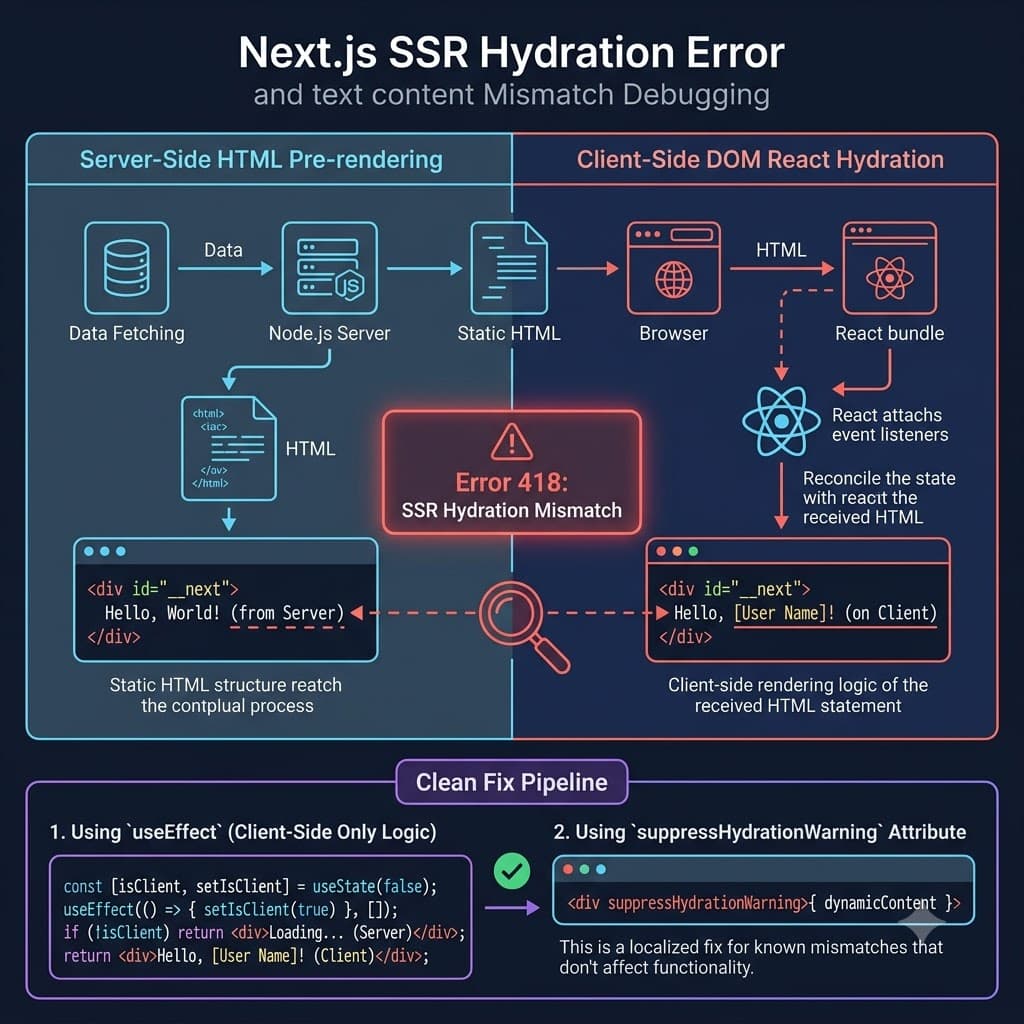
Before we fix the error, we need to understand the process. Next.js does two things when a user requests a page:
- Pre-rendering (Server Side): Next.js runs your React components on the server, generates raw HTML, and sends it to the browser. The user sees the page instantly, but it isn't interactive yet (buttons don't work, inputs are inert).
- Hydration (Client Side): React runs on the client, downloads the JavaScript bundle, walks the server-rendered HTML structure, and attaches event listeners (like
onClick) to make it alive.
Here is the golden rule of SSR: The HTML generated on the server must exactly match the HTML generated on the client's first render.
If there is even a single character of difference, React panics. It throws a hydration mismatch error, discards the server HTML, and rebuilds the page from scratch. This slows down your site and ruins the performance benefits of SSR.
| Phase | Where it Runs | Output | Responsibility |
|---|---|---|---|
| Pre-rendering | Node.js Server | Raw HTML & CSS | Instant visual paint |
| Hydration | User Browser | Event-bound DOM | Interactive page (alive) |
How to Fix "Text Content Does Not Match Server-Rendered HTML" (window & localStorage)
The most common cause of "Text content does not match server-rendered HTML" is referencing browser APIs directly in your component render path. During server-side pre-rendering, Node.js has no concept of window, document, or localStorage.
// ❌ THIS WILL CRASH ON THE SERVER OR MISMATCH
function MyComponent() {
  const width = window.innerWidth; // window is undefined on the server!
  return <div>Width: {width}</div>;
}
Even if you wrap it in a typeof window !== 'undefined' check to prevent a hard crash, you will still trigger a hydration error because the server output (<div>Desktop</div>) differs from what the browser renders on initial paint.
1-// ❌ Hydration Error: server gets "Server", client gets width1+// ✅ Safe: state is initialized on client mount2+import { useState, useEffect } from 'react';3+24 function ResponsiveLayout() {3- const isMobile = typeof window !== 'undefined' && window.innerWidth < 768;5+ const [isMobile, setIsMobile] = useState(false);6+7+ useEffect(() => {8+ setIsMobile(window.innerWidth < 768);9+ }, []);10+411 return <div>{isMobile ? 'Mobile' : 'Desktop'}</div>;512 }
The Hook Strategy
For browser APIs, always defer the state update to useEffect. Since useEffect only runs in the browser after mount, it never executes on the server. The initial HTML matches, and the client updates the UI safely afterward.
How to Fix React Error #418 & Dynamic Content (Dates, Timestamps & Math.random)
Minified React Error #418 occurs when server-rendered HTML text differs from client-rendered text. If you render the current timestamp or a random number in JSX, the server will output one string (e.g. at build or request time), while the client browser outputs a different string milliseconds later.
// ❌ Server: "Rendered at 10:00:00", Client: "Rendered at 10:00:02" -> Error #418
function CurrentTime() {
  return <div>Time: {new Date().toLocaleTimeString()}</div>;
}
There are two ways to solve this depending on what you need.
Solution A: Defer to Client Mount (Recommended)
If the data doesn't need to be there for SEO, wait until the component mounts to show it.
Initialize Mount State
Create a boolean state to track if the component has mounted in the browser.
Trigger in useEffect
Flip the boolean to true inside useEffect.
Conditional Render
Show a loading placeholder on the server and the actual date on the client.
import { useState, useEffect } from 'react';

export default function CurrentTime() {
  const [mounted, setMounted] = useState(false);

  useEffect(() => {
    setMounted(true);
  }, []);

  if (!mounted) return <div>Loading time...</div>;

  return <div>Time: {new Date().toLocaleTimeString()}</div>;
}
Solution B: Suppress Warning (For Static Content)
If the discrepancy is harmless (like a static timezone rendering or an intentional mismatch), you can tell React to ignore it using the suppressHydrationWarning attribute.
// This disables the console error for this specific element
<div suppressHydrationWarning>Time: {new Date().toLocaleTimeString()}</div>
Warning
suppressHydrationWarning only works one level deep and does not fix the underlying performance cost of React mismatch rebuilding. Use it sparingly for simple text nodes (like dates or timestamps), not large UI trees.
Fixing Invalid HTML Tag Nesting Mismatches (<div> Inside <p>)
Invalid HTML tag nesting is the sneakiest cause of hydration errors. It has nothing to do with JavaScript state or timing, but rather how browser DOM parsers automatically repair invalid HTML syntax.
If you nest a <div> inside a <p> tag, the browser's HTML parser will automatically close the <p> tag before the <div> is opened. This transforms your intended DOM structure into something completely different.
React expects the DOM structure parsed by the browser to match the virtual DOM tree generated on the server. When the browser forcibly rewrites and closes tags, React spots the mismatched tree depth and throws: "In HTML, <div> cannot be a descendant of <p>".
1-// ❌ Invalid HTML: browser forces <p> to close before <div>1+// ✅ Valid HTML: use divs or spans instead2-<p>2+<div>33 Check this out:44 <div>Nested container</div>5-</p>5+</div>
Common HTML nesting mistakes that trigger hydration errors:
- Placing
<div>or<p>inside another<p> - Placing
<ul>or<ol>directly inside a<p> - Putting a
<tr>directly under a<table>instead of wrapping it in<tbody> - Putting block elements (
h1,form,section) inside inline elements (a,span)
How to Debug Hydration Errors: Step-by-Step
Next.js 14+ gives you much better error overlays than before: but the trace can still be cryptic. Here is the exact workflow I use every time:
Step 1: Read the error diff in the overlay
When a hydration error fires in development, Next.js shows a red overlay with the server output and client output side by side. The first thing to do is read both sides carefully:
Server rendered:
  <div class="theme-dark">

Client rendered:
  <div class="theme-light">
This immediately tells you the mismatch is theme-related: look for localStorage or cookies being read during render.
Step 2: Test in Incognito with extensions disabled
Browser extensions are a silent hydration killer. Ad blockers, grammar checkers, and translator extensions inject DOM nodes or modify attributes before React hydrates. The server never saw those changes, so React panics.
Always reproduce the error in an Incognito window before you do anything else. If the error disappears in Incognito, a browser extension is your culprit: not your code.
Step 3: Enable Next.js Turbopack for better diffs
next dev --turbopack
Turbopack gives more precise hydration error messages than the default Webpack mode, including the exact component path and a character-level diff of the mismatch.
Step 4: Bisect with suppressHydrationWarning temporarily
If you can't find the source, add suppressHydrationWarning to your root <body> temporarily. This silences all hydration errors. Then remove it from one child component at a time until the error reappears: that's your culprit component.
// Temporary! Remove after finding the bug.
<body suppressHydrationWarning>
Remove After Debugging
suppressHydrationWarning on <body> silences all hydration warnings globally. It's a debugging tool only: never ship it to production as a permanent fix.
Step 5: Search for the common patterns with grep
Run these in your project root to find the most likely offenders:
# Find direct localStorage / sessionStorage reads in render paths
grep -rn "localStorage\|sessionStorage" src/ --include="*.tsx" --include="*.ts" | grep -v "useEffect"

# Find components using window without a guard
grep -rn "window\." src/ --include="*.tsx" | grep -v "typeof window"

# Find suppressHydrationWarning usage (should be rare)
grep -rn "suppressHydrationWarning" src/ --include="*.tsx"

# Find dynamic imports without ssr:false on heavy chart/map components
grep -rn "import dynamic" src/ --include="*.tsx"
Each result from the first two greps is a potential hydration error waiting to happen.
Fixing Browser Extension & Third-Party DOM Script Hydration Errors
This is the hardest category to debug because the bug isn't in your code at all. Libraries like jQuery plugins, legacy analytics scripts, or embedded widgets sometimes manipulate the DOM directly: adding attributes, wrapping nodes, or injecting elements.
React's hydration expects the DOM to be exactly what the server produced. Any external DOM mutation before hydration completes will cause a mismatch.
Common offenders:
- Google Translate widget: rewrites all text nodes in the DOM
- Hotjar / FullStory: inject iframe or attribute overlays
- Legacy jQuery plugins: call
.addClass()or.wrap()on mount - Browser translate feature: same as Google Translate widget
The fix: Load these scripts after hydration using next/script with strategy="afterInteractive":
import Script from 'next/script'

export default function Layout({ children }) {
  return (
    <>
      {children}
      {/* Load third-party DOM scripts only after React has hydrated */}
      <Script
        src="https://example.com/legacy-widget.js"
        strategy="afterInteractive"
      />
    </>
  )
}
For Google Translate specifically, the only reliable fix is to disable the browser's built-in Translate prompt using a meta tag: Google Translate rewrites text nodes in a way that is fundamentally incompatible with React's hydration:
<!-- In your <head>: disables browser translate prompt -->
<meta name="google" content="notranslate" />
Summary Checklist
| Mistake | Why it Fails | The Safe Pattern |
|---|---|---|
| window / localstorage | Fails: undefined on server | Use state initialized in useEffect |
| new Date() / Math.random() | Fails: values differ between runs | Defer rendering via mounted state |
| <div> inside <p> | Fails: browser rewrites invalid HTML | Keep tag structures semantic and valid |
| Third-party DOM scripts | Fails: mutate DOM before hydration | Use strategy="afterInteractive" |
Resolving React Error #423 in Suspense Boundaries & Streaming SSR
React 18 introduced streaming server-side rendering via Suspense. While this dramatically improves Time to First Byte, it introduces Minified React Error #423 and #425 when hydration boundaries conflict during streaming chunks.
When you wrap content in <Suspense>, React streams a fallback (like a spinner) to the browser first, then streams the resolved content when it's ready. The hydration mismatch happens when the client tries to reconcile a component that was streamed mid-render with a different local state.
// ❌ This can cause subtle hydration mismatches with streaming SSR
export default function Page() {
  return (
    <Suspense fallback={<Spinner />}>
      <UserDashboard /> {/* Fetches data async */}
    </Suspense>
  );
}

// Inside UserDashboard: DON'T do this
function UserDashboard() {
  const [theme] = useState(localStorage.getItem('theme')); // ❌ localStorage in SSR!
  // ...
}
The safe pattern with Suspense + streaming:
// ✅ Correct: keep client-only state inside useEffect, not initial state
function UserDashboard() {
  const [theme, setTheme] = useState<string | null>(null); // null = server-safe default

  useEffect(() => {
    setTheme(localStorage.getItem('theme') ?? 'light');
  }, []);

  return <div data-theme={theme ?? 'light'}>...</div>;
}
React 18 Streaming Rule
Any component inside a Suspense boundary that reads browser APIs must use the useEffect + mounted state pattern. The fallback render runs on the server, and the resolved render must match the initial client render exactly before useEffect fires.
Fixing 'use client' Serialization Boundary Mismatches in App Router
The App Router's Server Component model introduces a new category of hydration errors that didn't exist in the Pages Router. The core rule:
Server Components cannot pass non-serializable props to Client Components.
If you pass a function, a class instance, a Date object, or undefined through a Server → Client component boundary, Next.js will throw an error at build time or cause a silent hydration mismatch at runtime.
// ❌ This silently breaks hydration: Date is not serializable over the wire
// app/page.tsx (Server Component)
import ClientWidget from './ClientWidget'; // has 'use client'

export default function Page() {
  const timestamp = new Date(); // Date object: NOT serializable!
  return <ClientWidget createdAt={timestamp} />;
}
// ✅ Serialize to ISO string first: strings are always safe to pass
export default function Page() {
  const timestamp = new Date().toISOString(); // plain string ✅
  return <ClientWidget createdAt={timestamp} />;
}

// In ClientWidget: reconstruct on the client
'use client'
export function ClientWidget({ createdAt }: { createdAt: string }) {
  const date = new Date(createdAt); // safe to construct on client
  return <div>{date.toLocaleDateString()}</div>;
}
Common non-serializable types that break the boundary:
| Type | Error | Fix |
|---|---|---|
Date | Silent hydration mismatch | Pass .toISOString() string |
| Function | Build error | Move function to Client Component |
undefined | Prop becomes null | Use explicit null default |
| Class instance | Silent mismatch | Pass plain object {} instead |
BigInt | Serialization error | Convert to String(bigint) |
For a deep dive into separating Server and Client boundaries in large Next.js apps, see the Next.js App Router folder structure guide and the Next.js App Router caching strategies guide.
How to Test for Hydration Errors Before They Hit Production
The best hydration error is one you catch locally, not in a 3am Sentry alert. Here's a testing strategy that catches all four villain patterns before deploy.
1. Enable React Strict Mode (it's already on in Next.js)
Next.js enables <React.StrictMode> by default. In development, this intentionally renders components twice to surface side effects and hydration issues. If you see a component flash or double-render in dev: that's Strict Mode working. Don't disable it.
2. Write a Mounted Guard Unit Test
Use React Testing Library with user-event v14 to assert that components render the server-safe default before hydration:
import { render, screen } from '@testing-library/react'
import CurrentTime from './CurrentTime'

test('renders server-safe placeholder before mount', () => {
  render(<CurrentTime />)
  // On first render (simulating SSR), should show placeholder
  expect(screen.getByText('Loading time...')).toBeInTheDocument()
})
3. Check for suppressHydrationWarning Overuse
Run this grep before every PR to find suppressed warnings you may have forgotten:
grep -r "suppressHydrationWarning" src/ --include="*.tsx"
Each hit should have a comment explaining why. If there's no comment, it's a hidden bug.
4. Use Next.js --turbopack dev mode
Turbopack (Next.js 14+) gives more precise hydration error messages than Webpack, including the exact diff between server and client HTML. Enable it:
next dev --turbopack
Next Steps
Now that you know how to dodge hydration errors, audit your component tree architecture. For large applications, following a clean Next.js App Router folder structure helps keep Server and Client component boundaries strictly separated. If you are building data-driven interactive forms, check out our guide on React 19 Server Actions and Optimistic Updates to handle mutations without hydration flash, or learn how to wire up direct database queries using Next.js App Router with Prisma.
Frequently Asked Questions
What causes React error 418 in Next.js?
React error 418 means the server-rendered HTML doesn't match what React expected to find during hydration. Common causes are rendering window, localStorage, new Date(), or user-specific data directly in JSX during the initial render.
Does a browser extension cause hydration errors in Next.js?
Yes. Browser extensions like Grammarly, 1Password, and dark-mode extensions inject attributes (like data-new-gr-c-s-check-loaded or data-beasties-container) into <html> or <body> after server rendering. Add suppressHydrationWarning to the <html> element in your root layout to silence these.
How do I fix text content mismatch in Next.js?
Move any client-specific value (locale date strings, user names, window dimensions) into a useEffect that sets state after mount. Use useState(null) as the initial value and render a fallback or null until mounted.
What does suppressHydrationWarning do?
suppressHydrationWarning tells React to skip the hydration mismatch warning for that specific element. Use it on <html> and <body> tags to avoid false-positive warnings from browser extensions, but do NOT use it to silence real application bugs.
Interactive Hydration Debugger & Related Architecture Guides
Paste your error logs or component code into our free Next.js Hydration Error Matcher & Fixer Tool for real-time root-cause analysis and copy-paste code solutions.
Recommended Reading for Production Engineers:
- Stop Using fireEvent: React Testing Library user-event v14 Best Practices
- Zustand vs Jotai: Modern React State Management Comparison
- Next.js App Router: Clean Enterprise Folder Structure & Architecture
- Custom React Hook Performance Optimization Patterns
- Vitest Monorepo Unit Testing for High-Performance TypeScript Builds
- Playwright vs Cypress: Real-World Performance & Reliability Benchmarks
Frequently Asked Questions
What is a hydration error in Next.js?
A hydration error occurs when the HTML the server sends to the browser doesn't match what React tries to render on the client. React compares its virtual DOM tree against the server-rendered HTML during "hydration" - the process of attaching event handlers and making the page interactive. Any mismatch causes React to throw an error (commonly Error #418) and re-render from scratch, which can cause a visible flash of unstyled content.
What does suppressHydrationWarning do and when should I use it?
suppressHydrationWarning={true} tells React to silently accept a mismatch on a specific element without throwing an error or re-rendering. Use it only for elements whose content is intentionally different between server and client - like a timestamp, a random ID, or a browser-extension-injected attribute. Never use it to silence bugs you haven't diagnosed. Applied to <html> it silences browser extension attribute injection. Applied to a <time> element it silences dynamic date rendering.
Why does my Next.js hydration error say args[]=html?
The args[]=html pattern in the console error (often React Error 418) means a browser extension is injecting attributes into your <html> or <body> tag before React hydrates. Common culprits: Grammarly, LastPass, Dark Reader, and browser translate features. The fix is suppressHydrationWarning on your root <html> element in app/layout.tsx. This error is not in your code.
What is the difference between React Error 418, 423, and 425?
- Error 418: Hydration mismatch - server HTML doesn't match client render. Most common.
- Error 423: The component was suspended during hydration (Suspense boundary hit too early during streaming SSR). Fix by placing
<Suspense>boundaries above components that read async data. - Error 425: "Text content does not match" specifically during selective hydration. Usually caused by date/time values or
Math.random()rendering different values on server vs client. Fix withuseEffectdeferral.
How do I fix "Text content does not match server-rendered HTML" in Next.js?
This error means you're rendering something that produces different output on the server vs the client. Common causes: new Date(), Math.random(), window.innerWidth, or localStorage. Fix: initialize with a stable value (null, false, or an empty string) and update in useEffect after mount. Never access browser APIs during the initial render phase.
Free In-Browser Developer Tools
Clean AI CLI logs, build cron expressions, decode JWTs, and calculate chmod permissions offline.
Related Articles

Next.js App Router Complete Guide: Architecture, Patterns & Enterprise Best Practices (2026)
The comprehensive production guide to Next.js App Router: Server Components boundaries, advanced caching, streaming with Suspense, Server Actions, connection pooling, and enterprise route architecture.
Read more
Understanding React Hydration Mismatch and Server Components
Master debugging React hydration mismatches with Server Components, avoid client-server markup differences, and eliminate hydration errors in Next.js.
Read more
suppressHydrationWarning in Next.js: Complete Safe Usage & Debugging Guide
Comprehensive guide covering suppresshydrationwarning in next.js: complete safe usage & debugging guide with battle-tested production examples.
Read more