AI Agents in Software Engineering: Architecture Patterns That Actually Work

Table of Contents
The hype around AI agents focuses on what they might do eventually. This post focuses on what's working now — the architectural patterns behind production agent systems, the failure modes teams are hitting, and the infrastructure decisions you need to make before deploying an autonomous agent against a real codebase.
What Makes an Agent Different from a Chatbot
A chatbot responds to prompts. An agent executes a loop:
Observe → Think → Act → Observe (loop until goal met or budget exceeded)
The critical distinction is tool use with feedback. An agent doesn't just generate text — it calls tools, receives results, and decides what to do next based on those results. This creates a feedback loop that a single-shot LLM call doesn't have.
Concretely, an agent might:
- Read a failing test output
- Search the codebase for the relevant function
- Read the function implementation
- Modify the file
- Run the tests again
- Read the new output
- Iterate until tests pass
Each step uses tools. The LLM decides which tool to call based on context accumulated across steps. This is the ReAct (Reasoning + Acting) pattern, introduced in 2022, which underlies most production agent systems today.
The Tool-Calling Loop
At the implementation level, a minimal agent loop looks like this:
import anthropic
import json
from typing import Any

client = anthropic.Anthropic()

# Define the tools the agent can use
TOOLS = [
    {
        "name": "read_file",
        "description": "Read the contents of a file",
        "input_schema": {
            "type": "object",
            "properties": {
                "path": {"type": "string", "description": "File path to read"}
            },
            "required": ["path"]
        }
    },
    {
        "name": "run_command",
        "description": "Run a shell command and return stdout/stderr",
        "input_schema": {
            "type": "object",
            "properties": {
                "command": {"type": "string", "description": "Shell command to run"}
            },
            "required": ["command"]
        }
    },
    {
        "name": "write_file",
        "description": "Write content to a file",
        "input_schema": {
            "type": "object",
            "properties": {
                "path": {"type": "string", "description": "File path"},
                "content": {"type": "string", "description": "Content to write"}
            },
            "required": ["path", "content"]
        }
    }
]

def execute_tool(tool_name: str, tool_input: dict) -> str:
    """Execute a tool and return its output as a string."""
    import subprocess
    from pathlib import Path

    if tool_name == "read_file":
        path = Path(tool_input["path"])
        if not path.exists():
            return f"Error: file {path} does not exist"
        return path.read_text()

    elif tool_name == "run_command":
        result = subprocess.run(
            tool_input["command"],
            shell=True,
            capture_output=True,
            text=True,
            timeout=30
        )
        output = result.stdout
        if result.stderr:
            output += f"\nSTDERR:\n{result.stderr}"
        return output or "(no output)"

    elif tool_name == "write_file":
        path = Path(tool_input["path"])
        path.parent.mkdir(parents=True, exist_ok=True)
        path.write_text(tool_input["content"])
        return f"Written {len(tool_input['content'])} bytes to {path}"

    return f"Unknown tool: {tool_name}"

def run_agent(task: str, max_iterations: int = 20) -> str:
    """Run an agent loop until task completion or iteration limit."""
    messages = [{"role": "user", "content": task}]

    for iteration in range(max_iterations):
        response = client.messages.create(
            model="claude-opus-4-5",
            max_tokens=4096,
            tools=TOOLS,
            messages=messages,
        )

        # Add assistant response to history
        messages.append({"role": "assistant", "content": response.content})

        # Check if agent is done
        if response.stop_reason == "end_turn":
            # Extract text response
            for block in response.content:
                if hasattr(block, "text"):
                    return block.text
            return "Task completed"

        # Process tool calls
        if response.stop_reason == "tool_use":
            tool_results = []

            for block in response.content:
                if block.type == "tool_use":
                    print(f"  → Calling {block.name}({json.dumps(block.input)[:100]})")
                    result = execute_tool(block.name, block.input)
                    tool_results.append({
                        "type": "tool_result",
                        "tool_use_id": block.id,
                        "content": result
                    })

            messages.append({"role": "user", "content": tool_results})

    return f"Reached iteration limit ({max_iterations})"
This is the core. Everything else — memory, multi-agent coordination, safety guardrails — builds on top of this loop.
Model Context Protocol (MCP): Standardizing Tool Integration
The tool-calling loop above defines tools inline in JSON schema. For teams building multiple agents against multiple tools, this gets messy fast. Every agent redefines the same tools with slightly different schemas.
Model Context Protocol (MCP), introduced by Anthropic in late 2024, standardizes how agents connect to external systems. Instead of embedding tool definitions in every agent prompt, tools live in MCP servers that any compatible agent can query.
Agent ←→ MCP Client ←→ MCP Server (filesystem, GitHub, databases, etc.)
An MCP server exposes:
- Tools: Functions the agent can call (e.g.,
create_file,list_issues) - Resources: Data the agent can read (e.g., file contents, database records)
- Prompts: Parameterized prompt templates
# Example: connecting an agent to an MCP server
import asyncio
from mcp import ClientSession, StdioServerParameters
from mcp.client.stdio import stdio_client

async def run_agent_with_mcp(task: str) -> str:
    # Connect to a filesystem MCP server
    server_params = StdioServerParameters(
        command="uvx",
        args=["mcp-server-filesystem", "/workspace"]
    )

    async with stdio_client(server_params) as (read, write):
        async with ClientSession(read, write) as session:
            await session.initialize()

            # List available tools from the MCP server
            tools_result = await session.list_tools()
            tools = [t.model_dump() for t in tools_result.tools]

            # Run agent with MCP tools
            # (same loop as above, but tools come from MCP server)
            print(f"Available tools: {[t['name'] for t in tools]}")
            return "task_result"
MCP is now supported by Claude, OpenAI, Gemini, and most major agent frameworks. Building your tool layer as an MCP server means it works across model providers.
Memory: The Hardest Part
Agents have four types of memory, each with different tradeoffs:
| Type | Storage | Retrieval | Use Case |
|---|---|---|---|
| In-context | LLM context window | Automatic (everything in context) | Short tasks, fits in window |
| External (vector) | Vector database | Semantic similarity search | Long conversations, knowledge base |
| External (structured) | SQL/KV store | Exact lookup | User preferences, task state |
| In-weights | Model weights | Automatic (baked in) | Training data, can't be modified at runtime |
In-Context Memory
The simplest approach: keep the entire conversation in the context window. Works until your task exceeds the context limit (128K–200K tokens for current models).
Compression strategy: When approaching the limit, summarize older turns:
def compress_history(messages: list, keep_last_n: int = 10) -> list:
    """Compress old messages when approaching context limit."""
    if len(messages) <= keep_last_n:
        return messages

    # Summarize old messages
    old_messages = messages[:-keep_last_n]
    summary_prompt = f"""Summarize these agent actions and their results concisely:

{json.dumps(old_messages, indent=2)}

Summary (keep all file paths, error messages, and key decisions):"""

    summary_response = client.messages.create(
        model="claude-haiku-4-5",  # cheaper model for summarization
        max_tokens=1000,
        messages=[{"role": "user", "content": summary_prompt}]
    )

    summary = summary_response.content[0].text
    return [{"role": "user", "content": f"[Earlier context summary]: {summary}"}] + messages[-keep_last_n:]
Vector Memory
For tasks that span many sessions or need to recall prior knowledge, store agent observations in a vector database:
from qdrant_client import QdrantClient
from qdrant_client.models import Distance, VectorParams, PointStruct
import anthropic

embed_client = anthropic.Anthropic()

def store_observation(collection: str, text: str, metadata: dict) -> None:
    """Store an agent observation in vector memory."""
    # Get embedding
    response = embed_client.embeddings.create(
        model="voyage-3",
        input=[text]
    )
    vector = response.embeddings[0]

    qdrant = QdrantClient("localhost", port=6333)
    qdrant.upsert(
        collection_name=collection,
        points=[PointStruct(
            id=hash(text) % (2**32),
            vector=vector,
            payload={"text": text, **metadata}
        )]
    )

def recall_relevant(collection: str, query: str, top_k: int = 5) -> list[str]:
    """Retrieve relevant past observations for a query."""
    response = embed_client.embeddings.create(
        model="voyage-3",
        input=[query]
    )
    query_vector = response.embeddings[0]

    qdrant = QdrantClient("localhost", port=6333)
    results = qdrant.search(
        collection_name=collection,
        query_vector=query_vector,
        limit=top_k
    )

    return [r.payload["text"] for r in results]
Multi-Agent Coordination
Single agents hit limits: context size, task complexity, specialization needs. Multi-agent architectures break work into specialized agents that coordinate through a shared state.
Common patterns:
Orchestrator → Worker: One agent breaks down the task, dispatches sub-tasks to specialized workers, aggregates results:
def orchestrator_loop(high_level_task: str) -> str:
    """Orchestrator that delegates to specialized sub-agents."""
    subtasks = decompose_task(high_level_task)  # LLM call

    results = {}
    for subtask in subtasks:
        agent_type = route_to_agent(subtask)  # LLM call

        if agent_type == "code_writer":
            results[subtask] = run_code_agent(subtask)
        elif agent_type == "test_runner":
            results[subtask] = run_test_agent(subtask)
        elif agent_type == "reviewer":
            results[subtask] = run_review_agent(subtask)

    return aggregate_results(results)  # LLM call
Critic pattern: One agent produces output, another critiques it:
def generate_with_critique(task: str, max_rounds: int = 3) -> str:
    """Generate output, critique it, revise until acceptable."""
    content = run_agent(task)  # generator agent

    for _ in range(max_rounds):
        critique = run_agent(
            f"Review this output critically:\n\n{content}\n\n"
            f"Original task: {task}\n\n"
            "List specific issues. If acceptable, say 'APPROVED'."
        )

        if "APPROVED" in critique:
            return content

        content = run_agent(
            f"Revise based on this critique:\n\n{critique}\n\n"
            f"Current content:\n\n{content}"
        )

    return content
Safety Boundaries: What You Must Define Before Deploying
This is the part most tutorials skip. Agents that can modify files, run commands, and call external APIs can cause serious damage. Define these constraints before writing agent code:
1. Filesystem boundaries
from pathlib import Path

ALLOWED_WRITE_PATHS = [Path("/workspace"), Path("/tmp/agent")]
FORBIDDEN_PATHS = [Path("/etc"), Path("/root"), Path.home() / ".ssh"]

def safe_write_file(path_str: str, content: str) -> str:
    path = Path(path_str).resolve()

    for forbidden in FORBIDDEN_PATHS:
        if path.is_relative_to(forbidden):
            return f"BLOCKED: cannot write to {forbidden}"

    if not any(path.is_relative_to(allowed) for allowed in ALLOWED_WRITE_PATHS):
        return f"BLOCKED: {path} is outside allowed write paths"

    path.parent.mkdir(parents=True, exist_ok=True)
    path.write_text(content)
    return f"Written to {path}"
2. Command allowlist
import shlex

ALLOWED_COMMANDS = {"pytest", "ruff", "mypy", "npm", "git diff", "git status"}
FORBIDDEN_COMMAND_PREFIXES = ("rm -rf", "git push", "git reset --hard", "sudo", "curl", "wget")

def safe_run_command(command: str) -> str:
    # Check forbidden prefixes
    stripped = command.strip()
    for forbidden in FORBIDDEN_COMMAND_PREFIXES:
        if stripped.startswith(forbidden):
            return f"BLOCKED: command matches forbidden pattern '{forbidden}'"

    # Check against allowlist (optional — more restrictive)
    cmd_parts = shlex.split(stripped)
    base_cmd = cmd_parts[0] if cmd_parts else ""
    if base_cmd not in ALLOWED_COMMANDS:
        return f"BLOCKED: '{base_cmd}' not in allowed commands. Allowed: {ALLOWED_COMMANDS}"

    # Actually run
    import subprocess
    result = subprocess.run(command, shell=True, capture_output=True, text=True, timeout=60)
    return result.stdout + (f"\nSTDERR:\n{result.stderr}" if result.stderr else "")
3. Token and iteration budgets
Always define a maximum spend per task. Log all tool calls for audit. Alert on anomalous patterns (same command in a loop → potential issue).
The Actual Failure Modes
What breaks in practice:
- Tool call hallucination: Agent calls a tool with parameters that don't exist in the schema. Fix: validate inputs before execution, return structured errors.
- Context pollution: Old error messages crowd out relevant context. Fix: compress history, use structured tool results.
- Infinite loops: Agent repeatedly tries the same failing approach. Fix: track attempted actions, break on repeated identical calls.
- Overconfidence: Agent reports success without verifying. Fix: always verify — run tests, check file contents, don't trust the agent's self-report.
- Scope creep: Agent makes "helpful" changes beyond the original task. Fix: explicit task boundaries in the system prompt, diffs reviewed before commit.
You Might Also Like
Free In-Browser Developer Tools
Clean AI CLI logs, build cron expressions, decode JWTs, and calculate chmod permissions offline.
Related Articles

Building Your First MCP Server from Scratch: The Complete Python & Claude Guide
Step-by-step guide to building production Model Context Protocol (MCP) servers with Python, FastMCP, typed tools, resources, and Claude Desktop integration.
Read more
Vector Databases for Production RAG (2026): Pinecone vs Qdrant vs Milvus vs pgvector
An architectural benchmark of Pinecone, Qdrant, Milvus, and pgvector for production RAG pipelines: HNSW vs IVFFlat indexing, single-stage filtered search, p95 latency, and memory footprint.
Read more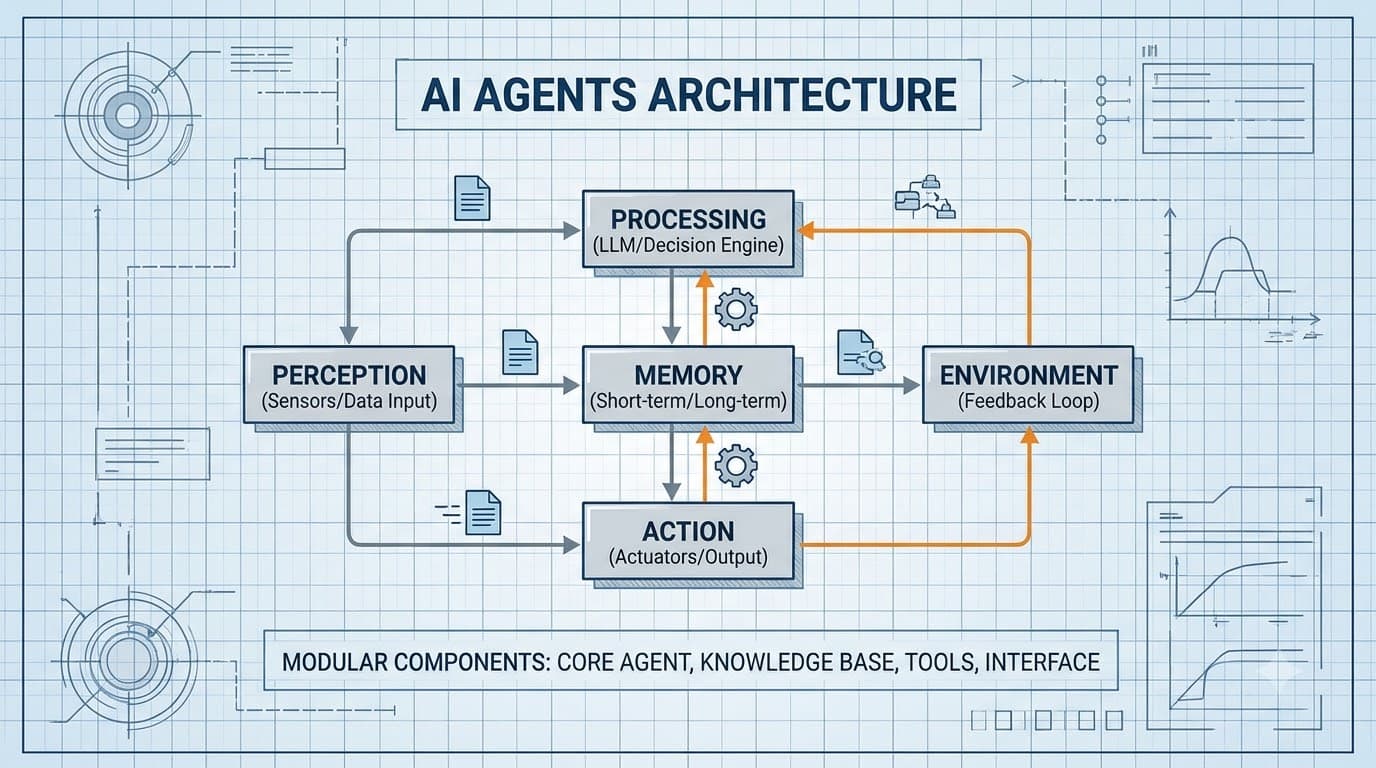
AI Agent Architecture in Practice: Memory, Tool Use, and Failure Modes
A working guide to building AI agent systems in 2026: ReAct loops, vector memory, tool calling patterns, multi-agent coordination, and how to test agents that fail gracefully.
Read more